
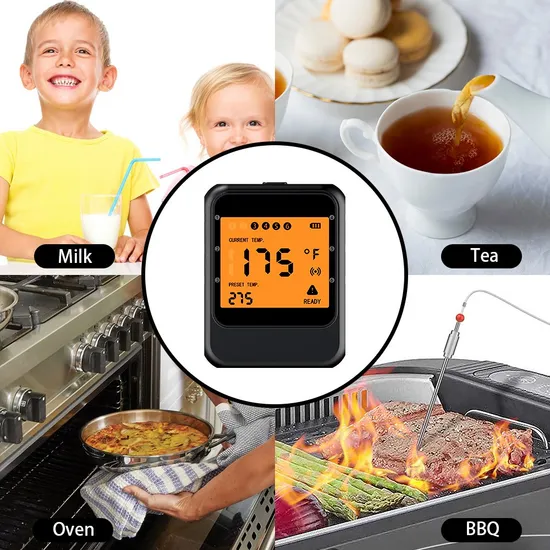
Are you tired of guessing if your meat is cooked just right? A smart kitchen thermometer can be your best cooking companion.
It takes the guesswork out of cooking, helping you achieve perfect results every time. Imagine juicy steaks, tender chicken, and flawless roasts without cutting into your food or risking undercooking. In this guide, you’ll discover simple steps to use a smart kitchen thermometer effectively and make your cooking easier and more enjoyable.
Keep reading to unlock the secret to perfectly cooked meals every time.

Credit: scispectrum.in
Benefits Of Smart Kitchen Thermometers
Smart kitchen thermometers help you cook food perfectly every time. They connect to your phone or tablet for easy monitoring.
These devices give accurate temperature readings and save you time in the kitchen. They make cooking safer and more precise.
Accurate Cooking Temperatures
Smart kitchen thermometers provide exact temperature readings. This helps you cook meat and other foods to the right doneness.
Accurate temperatures prevent undercooking or overcooking. You get better taste and safer meals every time.
Remote Monitoring
You can check the temperature from another room using your phone. This means you do not need to stand by the stove.
Remote alerts tell you when your food is ready. This saves time and stops food from burning or drying out.
Custom Cooking Settings
Smart thermometers let you set the exact temperature for different foods. You can choose settings for beef, chicken, fish, and more.
These settings help you cook food just the way you like it. They also guide you to safe cooking temperatures.
Time And Temperature Alerts
The thermometer sends alerts for cooking time and temperature changes. This reduces guesswork and improves results.
You get notified if the temperature is too high or too low. This helps avoid food spoilage and waste.
Easy To Use And Clean
Smart kitchen thermometers are simple to set up and use. Most models have probes that are easy to clean after cooking.
They save you time by giving quick, clear results without complicated steps. This makes cooking more fun and less stressful.
Types Of Smart Thermometers
Smart kitchen thermometers help cook food safely and perfectly. They connect to your phone or device for easy reading.
There are different types of smart thermometers. Each type works best for different cooking needs.
Instant-read Thermometers
Instant-read thermometers give a quick temperature reading. You insert the probe into the food and get results fast.
These thermometers are good for checking meat, poultry, and baked goods. They help avoid overcooking or undercooking.
Probe Thermometers
Probe thermometers have a long probe that stays in food while cooking. They send temperature data to your device continuously.
This type is great for slow cooking or smoking. You can monitor food without opening the oven or grill.
Infrared Thermometers
Infrared thermometers measure surface temperature without touching the food. Point the device at the food and get a quick read.
They are useful for checking frying oil, grill grates, or food surface heat. They do not measure internal temperature.
Features To Look For
Smart kitchen thermometers help you cook food perfectly. They give accurate temperature readings fast.
Choosing the right features can make cooking easier and safer. Here are key features to check.
Wireless Connectivity
Wireless connectivity lets you check temperatures from a distance. It uses Bluetooth or Wi-Fi.
This feature helps you avoid opening the oven or grill often. It keeps your food cooking evenly.
- Bluetooth works well for short range, like a kitchen or backyard.
- Wi-Fi allows you to monitor from anywhere with internet.
- Look for stable connections to avoid signal drops.
App Integration
Many smart thermometers connect to apps on your phone or tablet. Apps show real-time temperatures.
Apps often include cooking guides and alerts. They help you cook food safely and avoid overcooking.
- Choose apps that are easy to use and understand.
- Look for preset temperatures for common foods.
- Alerts for temperature changes can prevent mistakes.
Temperature Range
The temperature range shows how hot or cold the thermometer can measure. It must fit your cooking needs.
Check if the range covers low and high cooking temperatures. This helps with meats, baking, and candy making.
| Use | Temperature Range Needed |
|---|---|
| Meat and poultry | 32°F to 212°F (0°C to 100°C) |
| Baking | 100°F to 450°F (38°C to 232°C) |
| Candy making | 212°F to 400°F (100°C to 204°C) |

Credit: blinkit.com
Setting Up Your Smart Thermometer
Smart kitchen thermometers help you cook food perfectly. Setting them up correctly ensures accurate readings.
This guide will show you how to install the app, sync your device, and calibrate the thermometer.
Installing The App
First, download the thermometer’s app on your phone or tablet. The app lets you control and read the device.
Look for the app in the Apple App Store or Google Play Store by searching the thermometer brand name.
- Check your device’s compatibility with the app
- Download and install the app
- Allow necessary permissions for Bluetooth and notifications
Syncing With Devices
Turn on your smart thermometer and enable Bluetooth on your phone. Open the app to start syncing.
The app will search for nearby thermometers. Select your device from the list to connect.
- Keep your thermometer close to your phone during syncing
- Follow on-screen instructions to complete pairing
- Test the connection by checking temperature readings in the app
Calibration Tips
Calibration ensures the thermometer reads temperatures correctly. You can do this using ice water or boiling water tests.
Adjust the device settings if the readings are off. Check your thermometer’s manual for exact calibration steps.
- Place the probe in ice water (0°C or 32°F). Wait for a stable reading.
- If needed, adjust the temperature reading to 0°C (32°F).
- Place the probe in boiling water (100°C or 212°F) and check the reading.
- Adjust if the reading differs from the boiling point.
- Repeat these steps regularly for best results.
Using Smart Thermometers For Different Meats
Smart kitchen thermometers help cook meats safely and perfectly. They connect to phones and show exact temperatures.
Each type of meat needs a different cooking temperature. Using a smart thermometer can prevent undercooking or overcooking.
Beef And Pork
Beef and pork require specific internal temperatures for safety and taste. Smart thermometers give real-time readings.
For beef, use the thermometer to check if it is rare, medium, or well done. Pork should reach a safe minimum temperature.
- Rare beef: 125°F (52°C)
- Medium beef: 135°F (57°C)
- Well done beef: 160°F (71°C)
- Safe pork temperature: 145°F (63°C) with 3 minutes rest
Poultry
Poultry must be cooked thoroughly to kill harmful bacteria. Smart thermometers help reach the right temperature.
Insert the thermometer into the thickest part of the meat, avoiding bones. Wait for the temperature to stabilize.
- Chicken and turkey: 165°F (74°C)
- Check both breast and thigh for even cooking
Fish And Seafood
Fish and seafood cook quickly and need careful temperature control. Smart thermometers prevent overcooking.
Use the thermometer to check the thickest part of the fish. Different seafood types may need slightly different temperatures.
- Fish: 145°F (63°C)
- Shellfish: Cook until opaque and firm
- Shrimp and lobster: Cook until pink and firm

Credit: infrakraft.com
Achieving Perfect Doneness
Using a smart kitchen thermometer helps you cook meat just right. It shows the exact temperature inside the food.
Knowing the right temperature lets you avoid undercooking or overcooking. This way, your meals turn out juicy and tasty.
Understanding Temperature Zones
Different meats cook best at specific temperature zones. These zones tell you when your food is rare, medium, or well done.
Smart thermometers help you track these zones easily. They alert you when the food hits the right temperature.
- Rare: 120°F to 130°F (49°C to 54°C)
- Medium Rare: 130°F to 135°F (54°C to 57°C)
- Medium: 135°F to 145°F (57°C to 63°C)
- Medium Well: 145°F to 155°F (63°C to 68°C)
- Well Done: 155°F and above (68°C+)
Resting Meat For Optimal Results
After cooking, let the meat rest before cutting. Resting helps juices spread inside the meat.
Use your thermometer to check the temperature during resting. Meat will rise 5 to 10 degrees.
- Rest small cuts for 5 minutes
- Rest large cuts for 10 to 20 minutes
- Keep meat covered with foil while resting
Troubleshooting Common Issues
Smart kitchen thermometers help you cook food safely and perfectly. Sometimes, they do not work as expected. Knowing how to fix common problems saves time and stress.
This guide covers two common issues: connection problems and inaccurate readings. Follow simple steps to solve these problems quickly.
Connection Problems
Many smart thermometers connect to your phone or device via Bluetooth or Wi-Fi. If the connection fails, the thermometer cannot send temperature data.
Try these tips to fix connection problems:
- Make sure Bluetooth or Wi-Fi is turned on your phone.
- Keep the thermometer close to your phone or router.
- Turn the thermometer off and on again to reset it.
- Restart your phone or app that controls the thermometer.
- Check if the thermometer’s battery is charged or replace it.
- Remove old device pairings and pair the thermometer again.
- Update the thermometer’s app and firmware if updates are available.
Inaccurate Readings
Incorrect temperature readings can cause undercooked or overcooked food. Several reasons affect the accuracy of smart kitchen thermometers.
Check these points to improve accuracy:
- Insert the probe fully into the thickest part of the food.
- Avoid touching bones, fat, or the cooking pan with the probe.
- Clean the probe before and after use to avoid wrong readings.
- Calibrate the thermometer if your model supports calibration.
- Do not leave the probe in very hot liquids longer than needed.
- Replace batteries if the thermometer shows inconsistent readings.
- Store the thermometer in a cool, dry place to protect its sensors.
Maintaining And Cleaning Tips
Smart kitchen thermometers help you cook food safely. Keeping them clean and well-maintained is important.
Regular care keeps your thermometer accurate and extends its life. Follow simple steps for cleaning and storing.
Cleaning The Probe
After each use, clean the probe with warm, soapy water. Avoid submerging the entire device in water.
Dry the probe well to stop rust or damage. Use a soft cloth or paper towel for drying.
- Use mild dish soap and warm water
- Clean immediately after use
- Do not soak the whole thermometer
- Dry thoroughly with a soft cloth
Storing Your Thermometer
Store the thermometer in a dry place. Avoid areas with extreme heat or cold.
Use a protective case if available. This prevents damage to the probe and screen.
- Keep in a cool, dry spot
- Avoid direct sunlight or heat
- Use a cover or case if possible
- Do not store near sharp objects
Checking Battery And Calibration
Check the battery regularly to avoid sudden power loss. Replace batteries as soon as they run low.
Some smart thermometers need calibration. Follow the user guide to keep readings accurate.
- Test battery life often
- Change batteries if screen dims or device lags
- Calibrate using the instructions in the manual
- Recalibrate if readings seem off
Avoiding Damage During Use
Do not drop or bend the thermometer. Handle it gently while cooking and cleaning.
Avoid touching the probe to hard surfaces. This can cause cracks or affect accuracy.
- Hold the thermometer firmly but gently
- Keep probe away from hard or hot surfaces
- Do not use excessive force when inserting
- Avoid twisting or bending the probe
Top Brands And Models
Smart kitchen thermometers help you cook food perfectly. They show the exact temperature without opening the oven or grill.
Many brands offer models with different features. Here are some popular ones to consider.
Thermopro Tp20 Wireless Remote Digital Cooking Thermometer
The ThermoPro TP20 has two probes for cooking two items at once. It connects wirelessly to a remote device for easy monitoring.
It has preset temperature settings for many types of meat. The large LCD screen shows current and target temperatures.
- Two probes for multiple foods
- Wireless remote control
- Preset temperature alerts
- Large, easy-to-read display
Meater Plus Smart Wireless Meat Thermometer
MEATER Plus is fully wireless with no cords. It connects to your phone via Bluetooth for real-time updates.
The app guides you through cooking steps and estimates remaining cook time. It is easy to use and clean.
- Completely wireless design
- Bluetooth connection to phone
- Cooking guidance app
- Easy to clean and store
Inkbird Ibt-4xs Bluetooth Wireless Grill Bbq Thermometer
Inkbird IBT-4XS supports up to four probes. It works well for grilling and smoking with its Bluetooth range.
The thermometer app lets you monitor temperature from a distance. It also has preset temperatures for common meats.
- Four probe inputs
- Bluetooth app control
- Preset temperature options
- Good for grills and smokers
Igrill 3 By Weber
Weber iGrill 3 connects to your phone with Bluetooth. It works with up to four probes for different foods.
The device is durable and fits on Weber grills. The app lets you set custom alerts and track cooking progress.
- Bluetooth connection
- Up to four probes
- Custom alerts in app
- Designed for Weber grills
Thermoworks Signals Wi-fi Meat Thermometer
ThermoWorks Signals uses Wi-Fi and Bluetooth for wide-range monitoring. It supports four probes with easy-to-read screens.
The app alerts you if food reaches the right temperature. It is good for serious cooks who want precise control.
- Wi-Fi and Bluetooth connectivity
- Four probes supported
- Clear display on device
- App alerts for temperature
Frequently Asked Questions
What Is A Smart Kitchen Thermometer?
A smart kitchen thermometer is a digital device that connects to your smartphone. It monitors food temperature in real time. This helps ensure perfect cooking results. It offers alerts and precise readings for safety and taste.
How Do I Connect A Smart Thermometer To My Phone?
Most smart thermometers use Bluetooth or Wi-Fi. Download the compatible app on your phone. Follow the app instructions to pair the device. Once connected, you can monitor cooking temperatures remotely and receive notifications.
Can Smart Thermometers Improve Cooking Accuracy?
Yes, smart thermometers provide precise temperature readings. They reduce guesswork and prevent overcooking or undercooking. This ensures food safety and consistent quality. They are especially useful for grilling, roasting, and baking.
Are Smart Kitchen Thermometers Easy To Use?
Absolutely, smart thermometers are user-friendly. They typically have simple controls and clear displays. The companion apps guide you step-by-step. Even beginners can use them to improve cooking results quickly.
Conclusion
Smart kitchen thermometers help cook food safely and perfectly. They give quick, accurate temperature readings every time. Using one saves guesswork and prevents undercooking or overcooking. They work well for meat, baked goods, and more. Easy to use and clean, they fit any kitchen.
Trying one can make cooking less stressful and more fun. Small tool, big help in the kitchen. Keep your meals tasty and safe with smart thermometers.