
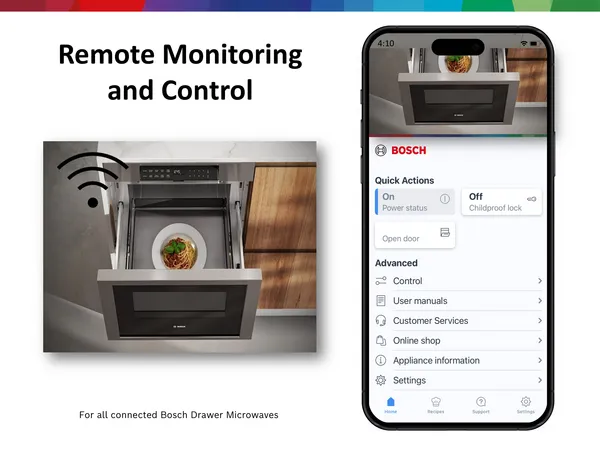
Imagine controlling your kitchen with just a tap on your phone. Wi-Fi-enabled kitchen appliances are changing how you cook, clean, and manage your home.
But are you getting the most out of these smart devices? Whether you want to save time, reduce energy use, or simply make cooking easier, knowing the right tips can transform your experience. Keep reading, and you’ll discover simple ways to make your smart kitchen work smarter for you every day.
Choosing The Right Wi-fi-enabled Appliances
Wi-Fi-enabled kitchen appliances can make cooking easier. They let you control devices from your phone or tablet.
Picking the right smart appliance is important. It helps you save time and energy in the kitchen.
Factors To Consider
Check if the appliance works well with your home Wi-Fi. Some need strong signals to function properly.
Look at the app quality. It should be easy to use and update regularly for new features and security.
- Compatibility with your Wi-Fi network
- User-friendly mobile app
- Energy efficiency ratings
- Security features to protect your data
- Customer support and warranty options
Popular Smart Appliances
Smart refrigerators can track groceries and suggest recipes. Some models also control temperature remotely.
Wi-Fi ovens allow you to preheat or adjust cooking times from anywhere. They help with meal planning.
- Smart refrigerators
- Wi-Fi ovens
- Connected coffee makers
- Smart dishwashers
- Voice-controlled microwaves

Credit: www.hindustantimes.com
Setting Up Wi-fi-connected Devices
Wi-Fi-enabled kitchen appliances make cooking easier and more fun. Setting them up correctly helps them work well with your home network.
This guide shows simple steps to connect your devices and fix common problems if they arise.
Initial Configuration Steps
Start by reading the appliance manual for Wi-Fi setup instructions. Make sure your phone or tablet is ready to connect to the device.
Follow these steps to connect your appliance:
- Plug in the appliance and turn it on.
- Open the appliance’s app on your phone or tablet.
- Connect your phone to the appliance’s Wi-Fi signal if needed.
- Select your home Wi-Fi network in the app.
- Enter your Wi-Fi password carefully.
- Wait for the appliance to connect to your network.
- Test the connection by using the app to control the appliance.
Troubleshooting Common Issues
If your appliance does not connect, check your Wi-Fi signal strength near the kitchen. A weak signal can cause connection problems.
Try these tips if you face issues:
- Restart your Wi-Fi router and appliance.
- Make sure your phone is on the same Wi-Fi network as the appliance.
- Check if the appliance needs a software update.
- Forget and reconnect to the appliance’s Wi-Fi in your phone settings.
- Move the appliance closer to the router if the signal is weak.
- Reset the appliance’s network settings and try setup again.
Maximizing Efficiency With Smart Appliances
Wi-Fi-enabled kitchen appliances help make cooking easier and faster. They connect to your phone or tablet for better control.
Using these smart devices well can save energy and time. Learning how to use them right helps you get the best results.
Energy-saving Tips
Smart appliances offer features that reduce power use. Set them to run during low energy times to save electricity.
Keep your appliances clean and well-maintained. This helps them work efficiently and use less energy.
- Use timers to run appliances at off-peak hours
- Turn off devices when not in use remotely
- Use energy-saving modes if available
- Clean filters and parts regularly
Optimizing Appliance Usage
Plan your cooking to use smart appliances together. For example, start the oven while the dishwasher runs.
Use apps to monitor cooking progress without opening doors. This keeps heat inside and saves energy.
- Preheat ovens only when needed
- Batch cook meals to reduce appliance use
- Use remote controls to adjust settings quickly
- Check appliance alerts to prevent overuse
Integrating Smart Appliances Into Daily Routine
Wi-Fi-enabled kitchen appliances make daily tasks easier. They connect to your smartphone or voice assistant.
Using smart appliances helps save time and keeps your kitchen organized. You can control devices from anywhere.
Automating Kitchen Tasks
Smart appliances let you automate many kitchen jobs. For example, you can start your coffee maker with a simple app tap.
Automation helps reduce manual work and makes cooking more efficient. You can set appliances to work together smoothly.
- Set your oven to preheat before you arrive home
- Use smart slow cookers to start cooking automatically
- Sync appliances to finish tasks at the same time
Scheduling And Notifications
Smart appliances allow scheduling to fit your daily timetable. You can plan meals ahead and avoid waiting.
Notifications keep you updated on cooking progress or maintenance needs. This helps prevent overcooking or appliance issues.
- Set timers for baking or cooking tasks
- Receive alerts when food is ready
- Get reminders for cleaning or filter changes
Enhancing Kitchen Safety
Wi-Fi-enabled kitchen appliances bring safety benefits to your home. They help you watch over your kitchen easily.
These smart devices send alerts and let you control them from a distance. This helps reduce accidents and hazards.
Monitoring And Alerts
Smart appliances can monitor cooking progress and send alerts to your phone. This keeps you aware of any problems.
You can get warnings about high temperatures, smoke, or when a cooking cycle finishes. These alerts help prevent fires and burns.
- Notifications for unusual heat or smoke
- Reminders to turn off appliances
- Alerts when cooking is done
Remote Control Features
You can control Wi-Fi appliances from anywhere using your phone. This means you can turn off or adjust appliances remotely.
Remote control helps stop accidents if you forget to turn off the oven or stove. It also allows quick changes to cooking settings safely.
- Turn appliances on or off from afar
- Adjust temperatures and timers remotely
- Pause or stop cooking if needed
Utilizing Voice Assistants For Control
Wi-Fi-enabled kitchen appliances can be controlled using voice assistants. This makes cooking and managing your kitchen easier.
You can start, stop, or adjust settings without touching buttons. Voice control helps you save time and keep your hands free.
Compatible Voice Assistants
Most Wi-Fi kitchen devices work with popular voice assistants. These include Amazon Alexa, Google Assistant, and Apple Siri.
Check your appliance’s manual to see which assistants it supports. Choose one that fits your other smart home devices.
- Amazon Alexa: Works with many brands and devices
- Google Assistant: Good for Android and Nest users
- Apple Siri: Ideal for iPhone and HomePod users
Voice Command Tips
Speak clearly and use simple commands. Start with basic instructions like “start,” “stop,” or “set temperature.”
Learn the exact phrases your appliance understands. This helps avoid confusion and makes control faster.
- Use short commands: “Turn on the oven” or “Set timer for 10 minutes”
- Speak at a normal volume and pace
- Confirm commands by listening to assistant’s response
- Group appliances by name for easier control, like “Kitchen oven”
Exploring Advanced Features
Wi-Fi-enabled kitchen appliances offer many smart features. These features help you cook and manage your kitchen with ease.
Let’s look at two useful features: recipe integration and self-diagnosis functions. They make your kitchen work smarter.
Recipe Integration
Some Wi-Fi kitchen appliances connect to recipe apps. This lets you send cooking instructions directly to the appliance.
You can choose a recipe on your phone and the appliance sets the right temperature and time automatically.
- Saves time by setting the appliance for you
- Reduces cooking mistakes
- Offers new meal ideas
- Lets you follow recipes step-by-step
Self-diagnosis Functions
Many smart kitchen appliances check their own condition. They send alerts if something needs attention.
This feature helps you fix small problems before they get worse. You can also plan repairs better.
- Detects errors early
- Saves repair time and cost
- Improves appliance lifespan
- Provides clear error messages
Maintaining And Updating Smart Appliances
Wi-Fi-enabled kitchen appliances make cooking easier and more fun. To keep them working well, you must maintain and update them regularly.
Proper care helps your smart appliances last longer. It also keeps them safe and efficient.
Regular Software Updates
Smart appliances need software updates to fix bugs and improve performance. Check for updates often to keep them running smoothly.
Update your device through its app or settings menu. Avoid ignoring update alerts to prevent security risks.
- Enable automatic updates if possible
- Check the app weekly for new updates
- Restart appliances after updates to apply changes
- Contact support if updates fail repeatedly
Cleaning And Care Tips
Keep your smart kitchen appliances clean to ensure they work well. Dirt and dust can cause damage or reduce efficiency.
Use gentle cleaning methods and avoid harsh chemicals. Always unplug devices before cleaning to stay safe.
- Wipe surfaces with a soft, damp cloth
- Clean sensors and touchscreens gently
- Remove and wash removable parts regularly
- Check vents and fans for dust buildup
- Follow the manufacturer’s cleaning instructions
Addressing Privacy And Security Concerns
Wi-Fi-enabled kitchen appliances make cooking easier. They also connect to the internet, which can cause safety worries.
It is important to protect your privacy and keep your devices secure. This helps stop hackers from accessing your information.
Securing Your Network
Use a strong password for your Wi-Fi network. Avoid simple or common passwords that others can guess easily.
Keep your router’s software updated. Updates fix security problems and protect your network from threats.
- Change the default Wi-Fi name (SSID)
- Use WPA3 or WPA2 encryption
- Turn off network sharing when not needed
- Separate smart appliances on a guest network
Data Privacy Practices
Read the privacy policy of your appliance’s app. Know what data the company collects and how it is used.
Limit the personal data you share with the app. Only provide information that is necessary for its functions.
- Turn off data sharing options if possible
- Use apps from trusted developers only
- Review app permissions regularly
- Delete old or unused apps linked to your devices
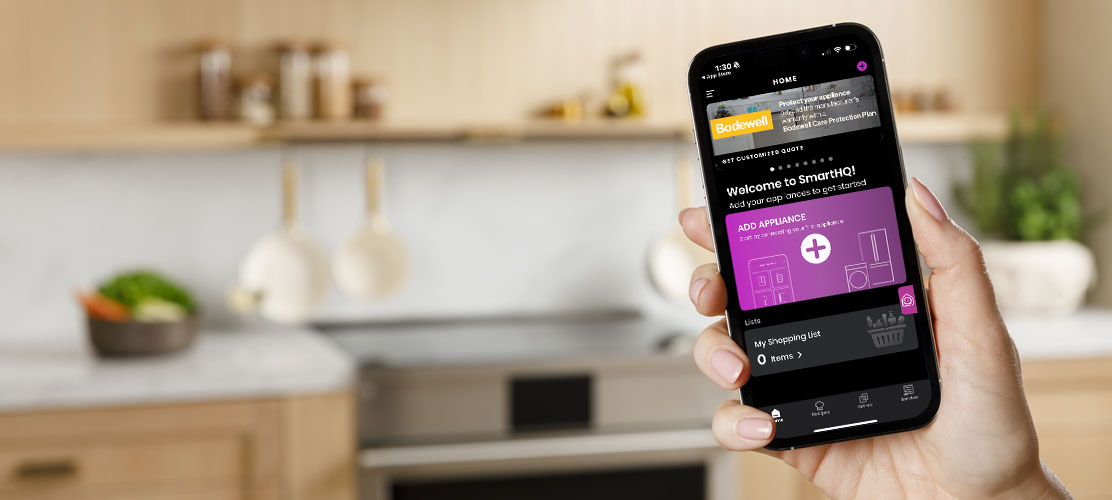
Credit: www.monogram.com

Credit: computercures.com.au
Frequently Asked Questions
How Do Wi-fi Kitchen Appliances Improve Cooking?
Wi-Fi kitchen appliances allow remote control and monitoring, saving time and reducing errors. They enable precise cooking settings and real-time notifications. This convenience enhances efficiency and ensures better meal results, making cooking easier and more enjoyable.
Are Wi-fi Kitchen Appliances Secure To Use?
Most Wi-Fi kitchen appliances use encryption and secure networks to protect data. Regular firmware updates improve security and prevent hacking risks. Users should connect devices to trusted networks and change default passwords for added safety.
Can Wi-fi Appliances Save Energy In The Kitchen?
Yes, Wi-Fi appliances offer energy-saving modes and scheduling features. Users can turn devices on or off remotely to avoid unnecessary power use. This helps reduce electricity bills and supports eco-friendly kitchen management.
What Should I Consider Before Buying Wi-fi Kitchen Appliances?
Check device compatibility with your home Wi-Fi and smartphone apps. Consider ease of use, security features, and energy efficiency. Reading customer reviews and comparing brands helps make an informed purchase decision.
Conclusion
Wi-Fi kitchen appliances make cooking easier and faster. Control devices from anywhere with your phone. Keep your appliances updated for better performance. Always protect your network to stay safe online. Small steps can improve your cooking experience. Enjoy the convenience without stress or confusion.
Smart kitchens bring comfort to everyday life. Use these tips to get the most out of your devices. Cooking can be fun and simple with technology. Try these ideas to make your kitchen work better.