
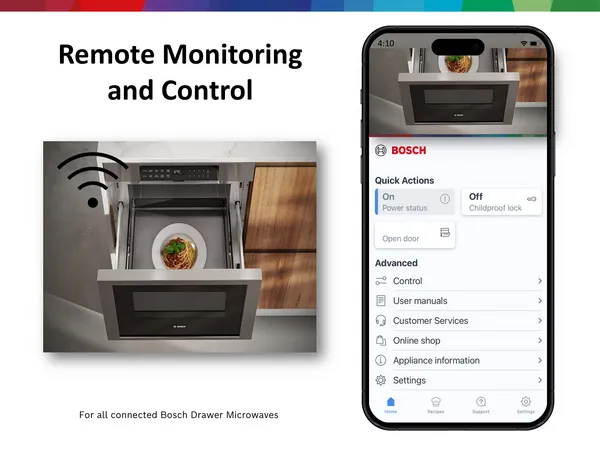
Imagine being able to check on your smart oven from anywhere, making sure your meal is cooking perfectly without standing in the kitchen all day. Sounds convenient, right?
But how do you keep track of your smart oven remotely without missing a beat? If you’ve ever worried about overcooking or undercooking your food while away, this guide is for you. Keep reading to discover simple yet effective tips that will help you monitor your smart oven with ease, saving you time and stress every time you cook.
Choosing The Right Smart Oven
Smart ovens offer convenience with remote monitoring. Picking the right one is important. Consider features and app compatibility.
Not all smart ovens are the same. Choose carefully to meet your needs and ensure easy monitoring.
Key Features To Look For
Smart ovens come with various features. Picking the right ones is crucial for ease and functionality.
- Wi-Fi connectivity for remote access
- Energy efficiency to save on bills
- Multiple cooking modes for versatility
- User-friendly interface for easy operation
Compatibility With Monitoring Apps
Check if the smart oven works with your favorite apps. Compatibility ensures seamless operation and control.
- Works with popular apps like Google Home or Alexa
- App updates for improved features
- Real-time notifications for cooking status
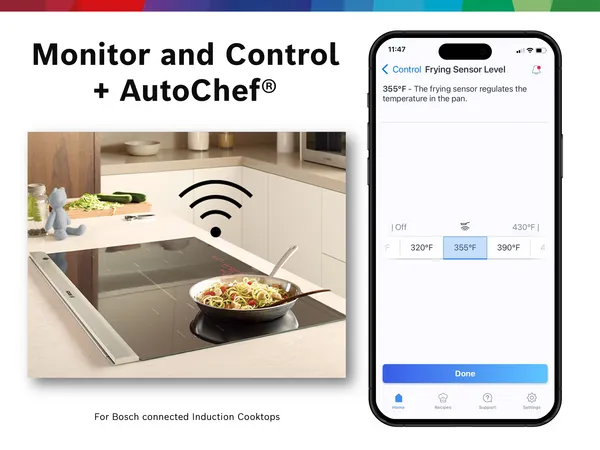
Credit: www.bosch-home.com
Setting Up Remote Access
Remote access lets you control your smart oven from anywhere. You can check cooking status or adjust settings without being in the kitchen.
To start, you need to connect your oven to the internet and allow your app to communicate with it. This guide explains how to do that safely.
Connecting To Wi-fi Networks
Connect your smart oven to a stable Wi-Fi network to enable remote control. A strong connection helps the oven respond quickly to commands.
Most ovens have a setup menu where you can find Wi-Fi settings. Choose your home network and enter the password carefully.
- Go to the oven’s settings menu
- Select Wi-Fi or Network option
- Choose your home Wi-Fi network
- Enter the correct password
- Wait for the oven to connect
Enabling App Permissions
Allow the smart oven app to use permissions on your phone. This lets the app send commands and receive updates from the oven.
Check your phone’s settings to enable permissions like location, notifications, and background data for the app.
- Open your phone’s Settings
- Find the smart oven app in the app list
- Enable permissions for location and notifications
- Allow background data use
- Restart the app to apply changes
Using Mobile Apps Effectively
Mobile apps help you watch your smart oven from anywhere. You can control cooking without being in the kitchen.
Using these apps well saves time and keeps your food cooking just right. Learn how to use alerts and controls.
Real-time Alerts And Notifications
Mobile apps send alerts when your oven needs attention. These alerts tell you if cooking is done or if there is an issue.
Real-time notifications help you act fast. You can avoid overcooking or burning your food by checking alerts on your phone.
- Receive cooking status updates instantly
- Get warnings if the oven temperature changes
- Know when the timer finishes
- Alerts for oven malfunctions or errors
Scheduling And Remote Control
Apps let you set cooking times before you get home. You can start or stop the oven from your phone.
Remote control means you can adjust settings anytime. This helps you cook food perfectly even if you are busy.
- Set cooking schedules to save time
- Change temperature without opening the oven
- Pause or stop cooking if needed
- Turn the oven on or off remotely
Maintaining Security And Privacy
Smart ovens connect to the internet to offer remote control. This makes it easy to cook from anywhere. But it also brings security risks.
Keeping your smart oven safe helps protect your home network and private data. Follow simple tips to stay secure.
Protecting Your Network
Secure your home Wi-Fi to stop hackers from accessing your smart oven. Use strong passwords and update your router regularly.
Turn on your router’s firewall and hide your network name. These steps make it harder for outsiders to find your devices.
- Use a unique and strong Wi-Fi password
- Enable WPA3 or WPA2 encryption on your router
- Update router firmware to fix security flaws
- Turn on the firewall for extra protection
- Disable network name broadcast (SSID hiding)
Managing User Access
Only allow trusted people to control your smart oven. Limit user accounts and set strong passwords for each one.
Review who can access your oven often. Remove old users and change passwords if you suspect a problem.
- Create separate user accounts with limited permissions
- Use strong, unique passwords for each account
- Regularly check and remove unused accounts
- Change passwords after any suspicious activity
- Enable two-factor authentication if available
Troubleshooting Common Issues
Smart ovens make cooking easier by connecting to your phone. Sometimes, issues happen that stop remote monitoring.
Knowing how to fix common problems helps you keep your oven working well from anywhere.
Connectivity Problems
Your smart oven needs a good internet connection to work remotely. If it loses connection, you can’t control it from your app.
Check your Wi-Fi signal near the oven. Weak signals cause delays or disconnections.
- Restart your router and oven to refresh connections
- Move the oven closer to the Wi-Fi router if possible
- Remove devices that may block the signal, like metal objects
- Ensure your Wi-Fi network is stable and has no outages
App Syncing Errors
The app and oven must sync to share data. Sync errors stop remote controls and status updates.
Make sure you use the latest app version. Old versions may not work well with your oven.
- Close and reopen the app to reset the connection
- Log out and back in to refresh your account data
- Clear the app cache from your phone settings
- Reinstall the app if syncing still fails

Credit: www.amazon.com
Maximizing Oven Performance Remotely
Smart ovens let you control cooking from anywhere. This helps save time and avoid mistakes.
To get the best results, monitor your oven often. Use simple tips to keep it working well.
Regular Firmware Updates
Firmware updates improve your oven’s software. They fix bugs and add new features.
Check for updates regularly. Install them to keep your oven running smoothly.
- Set automatic update alerts if possible
- Update when the oven is not in use
- Restart the oven after updating
- Check update notes for important changes
Using Preset Cooking Modes
Preset modes save time and control cooking well. They use the right heat and time for each dish.
Choose the mode that fits your recipe. This helps avoid overcooking or undercooking food.
- Use modes like bake, broil, or roast
- Follow the recommended settings for each mode
- Adjust presets only if needed
- Monitor cooking progress through the app
Credit: www.kitchenaid.com
Frequently Asked Questions
How Can I Monitor My Smart Oven Remotely?
You can monitor your smart oven using its dedicated mobile app. The app provides real-time updates on cooking status and temperature. Ensure your oven is connected to Wi-Fi for seamless remote access. Notifications alert you about cooking progress or any issues.
What Are The Best Apps For Smart Oven Monitoring?
Popular apps include those developed by oven manufacturers like Samsung SmartThings and Whirlpool Kitchen. These apps offer remote control, recipe suggestions, and cooking alerts. Choose an app compatible with your smart oven model for optimal performance and features.
How To Ensure Secure Remote Access To Smart Ovens?
Use strong, unique passwords for your smart oven accounts. Enable two-factor authentication if available. Keep your oven’s firmware and app updated to protect against vulnerabilities. Avoid using public Wi-Fi when accessing your smart oven remotely.
Can I Control Cooking Settings Remotely On Smart Ovens?
Yes, most smart ovens allow remote adjustment of temperature, cooking modes, and timers via their apps. This feature helps you start, pause, or stop cooking without being near the oven, offering convenience and better meal timing control.
Conclusion
Smart ovens make cooking easier and safer. Monitoring them remotely saves time and prevents problems. Use apps to check temperature and cooking progress anytime. Set alerts to avoid overcooking or burning food. Stay connected to your kitchen, even when away.
Small steps bring big benefits in daily cooking. Keep your smart oven updated for best performance. Enjoy peace of mind and better meals with remote monitoring. Simple tips help you get the most from your smart oven.