

Imagine controlling your home with just your voice—turning on the oven, adjusting the lights, or starting the washing machine without lifting a finger. It sounds like magic, but it’s easier than you think.
If you want to save time, add convenience, and make your daily chores simpler, learning how to use voice commands with your smart appliances is the key. You’ll discover simple steps to get started and unlock the full potential of your smart home.
Ready to make your life easier? Keep reading.
Setting Up Voice Control
Using voice commands with smart appliances can make life easier. It allows you to control devices without lifting a finger.
To get started, you need to set up voice control on your smart devices. This guide will help you through the process.
Choosing Compatible Appliances
Not all appliances work with voice assistants. Make sure to choose ones that are compatible.
Check the product details before buying a smart appliance. Look for labels that mention voice assistant compatibility.
- Works with Alexa
- Compatible with Google Assistant
- Supports Apple HomeKit
Connecting Devices To Voice Assistants
Once you have the right appliances, connect them to a voice assistant. This step is crucial for voice control.
Use the app that comes with your voice assistant. Follow the instructions to add your devices.
- Open the voice assistant app
- Select “Add Device”
- Choose your appliance from the list
Configuring Voice Settings
After connecting your devices, configure the voice settings. This ensures your commands are understood correctly.
Adjust the settings in the voice assistant app. You can set up custom commands and adjust volume levels.
| Setting | Description |
| Custom Commands | Create specific phrases to control devices |
| Volume Control | Set the response volume level |
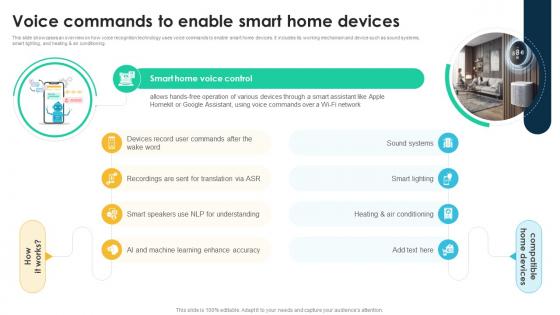
Credit: www.slideteam.net
Popular Voice Assistants
Voice commands make using smart appliances easier and faster. Popular voice assistants help you control devices with simple words.
These assistants connect to many smart home products. You can turn on lights, set the thermostat, or start your coffee maker by talking.
Amazon Alexa Features
Amazon Alexa works with many smart devices. It listens to your voice to perform tasks like playing music or setting reminders.
Alexa can control lights, locks, and thermostats. You just say commands like “Alexa, turn on the kitchen light.”
- Supports thousands of smart home brands
- Creates routines for multiple actions
- Answers questions and provides news updates
- Works with Echo devices and third-party speakers
Google Assistant Capabilities
Google Assistant understands natural language well. It helps you control smart devices and get information quickly.
You can say, “Hey Google, set the thermostat to 72 degrees,” and it will follow your command.
- Integrates with many smart home products
- Offers personalized help based on your schedule
- Supports voice control for lights, cameras, and more
- Works on phones, speakers, and smart displays
Apple Siri Integration
Siri works with Apple HomeKit devices. You can ask Siri to control your smart appliances by voice.
Say commands like, “Hey Siri, turn off the living room lights,” to manage your home easily.
- Works with HomeKit-enabled smart devices
- Offers privacy and secure voice control
- Integrates with iPhone, iPad, and HomePod
- Supports creating scenes to control multiple devices
Basic Voice Commands
Voice commands let you control smart appliances easily. You can speak to turn devices on or off, change settings, and set timers.
Using simple phrases makes it fast to manage your home gadgets. This guide explains common commands for everyday use.
Turning Appliances On And Off
You can switch your smart appliances on or off with clear voice commands. Just say what you want to control and the action.
For example, say “Turn on the living room light” to start it or “Turn off the coffee maker” to stop it.
- “Turn on [appliance name]”
- “Turn off [appliance name]”
- “Switch on the fan”
- “Switch off the heater”
Adjusting Settings And Modes
Smart appliances let you change settings by voice. You can adjust temperature, speed, or modes with simple commands.
For example, say “Set the thermostat to 72 degrees” or “Change washing machine to quick wash mode.”
- “Set [appliance] to [setting/value]”
- “Change [appliance] mode to [mode name]”
- “Increase/decrease [setting] on [appliance]”
- “Make the fan speed high”
Scheduling And Timers
You can schedule smart appliances to run at certain times. Voice commands help set timers and start or stop devices later.
Say “Start the dishwasher at 8 PM” or “Set a timer for 30 minutes on the oven” to manage cooking easily.
- “Schedule [appliance] to turn on/off at [time]”
- “Set timer for [appliance] for [duration]”
- “Start [appliance] in [minutes/hours]”
- “Stop [appliance] after [time]”
Advanced Voice Controls
Voice commands make using smart appliances easier and faster. Advanced voice controls let you do more than just basic tasks.
You can customize commands, create routines, and even troubleshoot problems using your voice.
Customizing Commands
Customizing voice commands helps your smart devices understand your needs better. You can change default commands to suit your style.
This makes it easier to control your appliances without remembering exact phrases.
- Rename commands for easier recall
- Create short phrases for long actions
- Add personal names for devices
Creating Routines And Automation
Routines let you perform many actions with one voice command. You can automate tasks to save time every day.
For example, say “Good morning” to start coffee, turn on lights, and play music.
- Combine actions into one routine
- Set specific times to run routines
- Use location triggers for automation
Using Voice For Troubleshooting
You can ask your smart appliances to help fix problems using voice commands. This saves time and avoids confusion.
Voice controls can guide you through simple fixes or give status updates on your device.
- Check appliance status by voice
- Get step-by-step repair instructions
- Reset devices using voice commands
Security And Privacy Tips
Using voice commands with smart appliances makes life easier. It is important to keep your data safe.
Follow simple security and privacy tips to protect your information and devices.
Managing Voice Data
Voice data helps smart devices understand you better. Keep control of what is stored and shared.
Review and delete your voice recordings regularly. Check your device settings for data management options.
- Limit data storage time
- Turn off voice history if possible
- Use devices that encrypt voice data
Setting Voice Recognition
Set up voice recognition to prevent others from controlling your appliances. Use personalized voice profiles.
Teach your device to recognize only your voice. This reduces the risk of unauthorized access.
- Create unique voice profiles for each user
- Disable voice commands from unknown voices
- Update voice recognition settings regularly
Protecting Your Network
Smart appliances connect to your home network. Secure your Wi-Fi to keep devices safe from hackers.
Use strong passwords and update your router firmware often. This helps stop unauthorized access.
- Set a strong Wi-Fi password
- Use WPA3 or WPA2 security type
- Turn off network features you do not use
- Keep your router software updated
Credit: www.wtsoundic.com
Troubleshooting Common Issues
Voice commands make smart appliances easier to use. Sometimes, problems occur with voice control. Knowing how to fix these issues helps you keep using your devices smoothly.
This guide covers common problems like connection troubles, unrecognized commands, and device compatibility. Each section offers tips to solve these problems fast.
Connectivity Problems
Smart appliances need a strong internet connection to work with voice commands. Weak or lost connections cause devices to stop responding.
Check your Wi-Fi signal and router first. Restart your router and smart device to refresh the connection. Keep devices close to the router for better signal.
- Move the device closer to your Wi-Fi router
- Restart your router and smart appliance
- Check for network outages in your area
- Update your router’s firmware regularly
Unrecognized Commands
Sometimes your smart appliance does not understand your voice commands. This can happen if the command is unclear or the device has trouble hearing you.
Speak clearly and use simple phrases the device supports. Make sure the microphone is not blocked or too far away. Check the device’s manual for exact command words.
- Speak slowly and clearly
- Use commands listed in your device guide
- Reduce background noise
- Make sure the microphone is clean and open
Device Compatibility Challenges
Not all smart appliances work with every voice assistant. Some devices only support certain brands or require special apps.
Check if your appliance works with your voice assistant before setting it up. Update both device software and apps to keep them compatible.
- Confirm your appliance supports your voice assistant
- Update device firmware and voice assistant app
- Use the official app to link your devices
- Check manufacturer’s website for compatibility info
Future Trends In Voice-controlled Appliances
Voice commands are changing how we use home appliances. They make tasks easier and faster.
New technology will make voice-controlled appliances smarter and more helpful in daily life.
Ai And Machine Learning Advances
Artificial intelligence helps appliances understand voice commands better. They learn from user habits.
Machine learning allows devices to improve over time. They can predict what you need.
- Recognize different voices in a home
- Understand natural language and slang
- Adapt to user preferences automatically
Integration With Smart Homes
Voice-controlled appliances will connect more with smart home systems. They will work with other devices.
This integration allows easy control of lights, thermostats, and security using one voice command.
- Unified voice control for many devices
- Automation based on voice routines
- Remote control through voice apps
Expanding Appliance Capabilities
Voice commands will let appliances do more than simple tasks. They will manage complex actions.
Appliances may suggest recipes, adjust settings for health, or provide energy-saving tips by voice.
- Smart ovens that guide cooking steps
- Refrigerators that track food and suggest meals
- Washers that adjust cycles based on fabric

Credit: www.smarthome.com.au
Frequently Asked Questions
How Do I Connect Voice Commands To Smart Appliances?
To connect voice commands, link your smart appliance to a compatible voice assistant app. Enable the appliance skill or feature in the app. Follow setup instructions to authorize control. Once connected, use specific voice phrases to operate your appliance hands-free.
Which Voice Assistants Work With Smart Appliances?
Popular voice assistants like Amazon Alexa, Google Assistant, and Apple Siri work with many smart appliances. Compatibility depends on the appliance brand and model. Check the appliance manual or website to confirm supported voice platforms for seamless integration and control.
Can Voice Commands Control Multiple Smart Appliances?
Yes, voice commands can control multiple smart appliances if they are linked to the same voice assistant. Group appliances by room or function within the app for easier management. Use simple commands like “turn off all kitchen devices” for efficient control.
Are Voice Commands Secure For Smart Appliances?
Voice commands use encryption and authentication to ensure security. Always keep your smart assistant and appliance software updated. Use strong passwords and enable two-factor authentication if available. This protects your devices from unauthorized access via voice control.
Conclusion
Voice commands make using smart appliances easy and fast. You just speak, and your device listens. This saves time and effort every day. Start with simple commands to get comfortable. Try turning lights on or off by voice. Soon, you can control many devices hands-free.
Keep your commands clear and short for best results. Smart appliances can help make life smoother and more fun. Give voice control a try and enjoy the convenience it brings.