
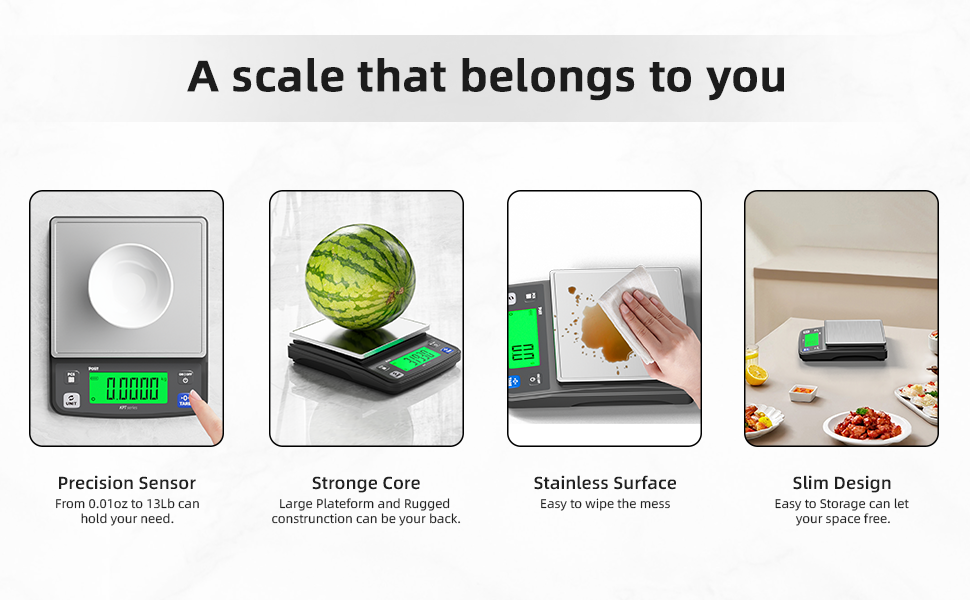
Are you tired of guessing measurements in your recipes and ending up with inconsistent results? Using smart kitchen scales can change the way you cook and bake, giving you precise control over every ingredient.
But to get the best from your smart scale, you need to know how to use it accurately. You’ll discover simple tips and tricks that will help you master your smart kitchen scale, so your meals turn out perfect every time.
Ready to take your cooking to the next level? Keep reading and unlock the full potential of your smart kitchen scale.

Credit: www.amazon.ca
Choosing The Right Smart Kitchen Scale
Smart kitchen scales help you measure ingredients with precision. They connect to your phone or tablet for easy tracking.
Picking the right scale makes cooking and baking easier. You should think about features and device compatibility.
Features To Look For
Look for scales with clear displays and easy controls. Accurate sensors are important for exact measurements.
Some scales offer tare functions. This lets you reset the weight to zero after adding a container.
- Clear digital display
- High precision sensors
- Tare function to subtract container weight
- Units of measurement options (grams, ounces)
- Easy to clean surface
Compatibility With Devices
Check if the scale works with your phone or tablet. Most use Bluetooth to connect with apps.
Make sure the app supports your operating system. Some scales only work with iOS or Android devices.
- Bluetooth connectivity for wireless use
- Compatible with iOS and Android apps
- Easy app setup and syncing
- Option to export data from the app
:max_bytes(150000):strip_icc()/faw-kitchen-scales-primary-nsimpson-1-1-4e80d8cc755a48029ac3ac5709583fec.jpeg)
Credit: www.foodandwine.com
Setting Up Your Smart Scale
Using a smart kitchen scale helps you measure ingredients with ease. Setting it up correctly ensures accurate results every time.
This guide explains how to set up your smart scale properly before use.
Calibration Process
Calibration makes sure your scale shows the right weight. You must do this before weighing food.
Follow these steps to calibrate your smart scale:
- Turn on the scale and wait for it to show zero.
- Place a calibration weight or a known object on the scale.
- Press the calibration button or follow the app instructions.
- Wait until the scale confirms calibration is complete.
- Remove the weight and check if the display resets to zero.
Connecting To Apps
Most smart scales connect to a mobile app to track your measurements. This helps keep your cooking organized.
To connect your scale to an app, follow these steps:
- Download the scale’s companion app from your app store.
- Turn on Bluetooth on your phone.
- Open the app and create an account if needed.
- Follow the app prompts to pair with your scale.
- Once connected, the app will display your weights automatically.
Understanding Measurement Units
Smart kitchen scales help you measure ingredients with ease. Knowing how to read the units is important for accuracy.
Different recipes may use different units. Learning about these units helps you follow recipes correctly.
Metric Vs Imperial
Metric units use grams and kilograms to measure weight. This system is common in most countries.
Imperial units use ounces and pounds. This system is popular in the United States and some other places.
- Metric: grams (g), kilograms (kg)
- Imperial: ounces (oz), pounds (lb)
Switching Units On The Scale
Most smart kitchen scales let you switch between metric and imperial units. This feature helps you use any recipe easily.
Look for a button labeled “Unit” or “Mode” on your scale. Press it to change the measurement units.
Tips For Accurate Weighing
Smart kitchen scales help measure ingredients easily. To get correct results, use the scales properly.
Small mistakes can change the weight. Follow simple tips for the best accuracy.
Using A Flat Surface
Place your smart scale on a flat and hard surface. Avoid soft or uneven places like a bed or couch.
A flat surface keeps the scale steady. This helps the scale show the right weight every time.
- Use a kitchen counter or table
- Make sure the surface is clean and dry
- Keep the scale away from vibrations
Taring The Scale
Taring means setting the scale to zero before weighing. This removes the weight of containers or bowls.
Put your empty container on the scale. Press the tare button to reset the weight to zero. Now you only measure the ingredient.
- Place container on the scale
- Press the tare or zero button
- Add the ingredient to weigh
- Read the weight displayed
Maintaining Your Smart Scale
Keeping your smart kitchen scale in good shape helps it work well. Proper care improves its accuracy and lifespan.
Simple maintenance steps prevent damage and keep the scale ready for use anytime.
Cleaning And Storage
Clean your smart scale regularly to remove food particles and spills. Use a soft, damp cloth to wipe the surface gently.
Avoid using harsh chemicals or soaking the scale in water. Store the scale in a dry place away from direct sunlight or heat.
- Use a soft cloth and mild soap if needed
- Do not immerse the scale in water
- Keep the scale on a flat, stable surface
- Store in a cool, dry area when not in use
Battery Management
Check the battery level often to ensure the scale works without interruption. Replace batteries as soon as the display dims or the scale becomes slow.
Remove batteries if you will not use the scale for a long time. This helps prevent battery leaks and damage to the device.
- Use the correct battery type recommended by the manufacturer
- Replace batteries promptly when low
- Remove batteries if storing the scale for months
- Keep spare batteries on hand for quick replacement
Troubleshooting Common Issues
Smart kitchen scales can make cooking easier. Sometimes, they face common problems.
Knowing how to fix these issues helps you use the scale correctly every time.
App Connectivity Problems
Smart kitchen scales often connect to apps via Bluetooth or Wi-Fi. If the connection fails, the scale may not send data.
Try turning Bluetooth or Wi-Fi off and on again. Make sure the app and scale are close to each other.
- Check if Bluetooth or Wi-Fi is enabled on your phone.
- Restart the app and the scale.
- Update the app to the latest version.
- Remove and re-pair the scale in your device settings.
- Ensure no other device is connected to the scale.
Inaccurate Readings
Sometimes the scale shows wrong weights. This can happen if the scale is not on a flat surface or if it needs calibration.
Clean the scale’s surface and check the battery level. Calibration resets the scale to zero for accurate measurements.
- Place the scale on a hard, flat surface.
- Remove any objects before turning it on.
- Calibrate the scale following the user guide.
- Replace batteries if readings jump or stay at zero.
- Avoid moving or touching the scale during use.
Enhancing Cooking Experience
Smart kitchen scales help you cook with precision. They measure ingredients quickly and accurately.
Using these scales improves your cooking results. You can follow recipes closely and avoid mistakes.
Tracking Nutritional Information
Smart kitchen scales show the weight of your food. This helps track calories and nutrients easily.
You can monitor your diet better by knowing exact amounts. This supports healthy eating habits.
- Measure portions to control calorie intake
- Check fat, protein, and carb content
- Keep track of daily nutrition goals
- Adjust meals based on nutrient data
Integrating With Recipes
Smart scales connect to apps that guide you through recipes. They show exact ingredient amounts on screen.
This helps you follow recipes step-by-step. You reduce errors by measuring directly on the scale.
- Use app timers and instructions along with weighing
- Save favorite recipes with accurate ingredient weights
- Adjust serving sizes and get new measurements
- Make cooking simpler and less stressful

Credit: polit-global.com
Frequently Asked Questions
How Do Smart Kitchen Scales Improve Cooking Accuracy?
Smart kitchen scales provide precise measurements for ingredients. They connect to apps that offer nutritional data and recipe guidance. This reduces guesswork and enhances cooking consistency. Using these scales ensures better portion control and improved meal quality.
Can Smart Kitchen Scales Measure Liquids Accurately?
Yes, many smart kitchen scales have liquid measurement modes. They often include tare functions to subtract container weight. This feature helps measure liquids in grams or milliliters precisely. Accurate liquid measurement improves recipe results and cooking efficiency.
How To Calibrate A Smart Kitchen Scale Properly?
To calibrate, place the scale on a flat surface first. Use a calibration weight or an object with known weight. Follow the manufacturer’s instructions in the app or manual. Regular calibration maintains scale accuracy and reliable measurements.
What Are Common Mistakes When Using Smart Kitchen Scales?
Common errors include not taring the container, uneven surfaces, and ignoring calibration. Overloading the scale can cause damage or incorrect readings. Avoid these mistakes to ensure precise measurements and prolong scale lifespan.
Conclusion
Smart kitchen scales help you cook and bake with great accuracy. Always place your scale on a flat surface for best results. Tare your container before adding ingredients to measure correctly. Use the right units for your recipe to avoid mistakes.
Clean your scale regularly to keep it working well. Practice using your scale, and you will get faster. Precise measuring leads to better tasting food every time. Smart scales make cooking easier and more enjoyable. Keep these tips in mind, and your meals will improve.