
Imagine controlling your home appliances with just your voice. Sounds convenient, right?
If you want to make your life easier and smarter, connecting your appliances to Alexa is the way to go. You might wonder how to start or if it’s complicated. Don’t worry—this guide will walk you through every step, so you can enjoy hands-free control in no time.
Ready to transform your home? Let’s dive in and make your smart appliances work for you.
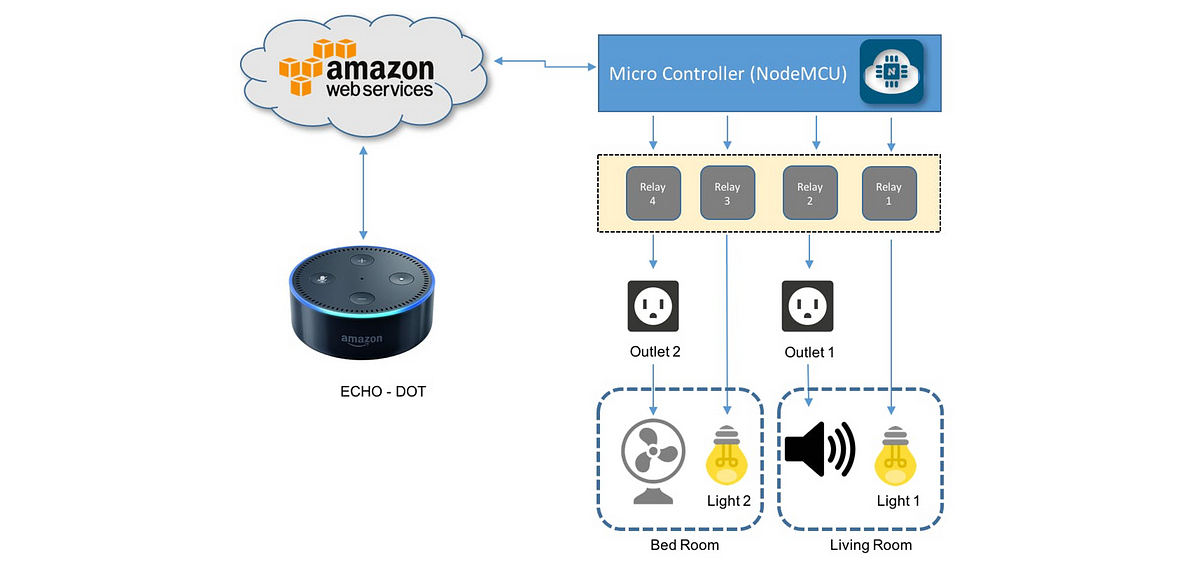
Credit: medium.com
Benefits Of Smart Appliances With Alexa
Smart appliances work with Alexa to make life easier. They let you control your home devices using voice commands.
Connecting smart appliances to Alexa adds convenience and saves time every day.
Hands-free Control
You can operate appliances without using your hands. Just speak to Alexa to start or stop devices.
This is helpful when your hands are busy or dirty, like while cooking or cleaning.
Energy Savings
Smart appliances with Alexa help reduce energy use. You can turn off devices remotely or set schedules.
This lowers your electricity bills and helps the environment by using less power.
Improved Home Security
Connecting security devices like smart locks and cameras to Alexa adds safety. You get alerts and control access with voice commands.
You can check your home’s status anytime without physically being there.
Custom Routines
Alexa lets you create routines that control many appliances at once. You can set multiple actions with one command.
For example, say “Good night” to turn off lights, lock doors, and adjust the thermostat.
Remote Access And Monitoring
You can control your smart appliances from anywhere using the Alexa app. This helps when you forget to turn something off.
It also allows you to monitor appliances and receive status updates anytime.
Setting Up Alexa For Smart Devices
Connecting smart appliances to Alexa makes your home easier to control. Alexa can manage lights, thermostats, and more.
Start by setting up Alexa to recognize your smart devices. This guide shows you how to do it step by step.
Check Device Compatibility
Not all smart devices work with Alexa. Check if your appliance supports Alexa integration before setup.
Look for the Alexa logo or check the device manual for compatibility information.
Install The Alexa App
Download the Alexa app on your smartphone. It is available on both iOS and Android devices.
Open the app and sign in with your Amazon account to start the setup process.
Connect Your Smart Device To Wi-fi
Make sure your smart appliance is connected to your home Wi-Fi network. This is needed for Alexa to control it.
Follow your device’s instructions to join the Wi-Fi network. Keep your phone near the appliance during setup.
Enable The Device Skill In Alexa App
Open the Alexa app and tap on “Skills & Games.” Search for your device brand.
Enable the skill and log in with your device account if needed. This links Alexa to your smart appliance.
Discover Devices With Alexa
Ask Alexa to find new devices by saying, “Alexa, discover devices.”
The app will scan and add your smart appliances. You can also tap “Add Device” in the app to find devices manually.
Assign Devices To Groups
Group your smart devices by room or function for easier control. For example, group all kitchen lights together.
In the Alexa app, go to “Devices,” select “Groups,” and create or edit groups as needed.
Test Voice Commands
Try simple voice commands to check if Alexa controls your smart appliances correctly.
- “Alexa, turn on the living room light.”
- “Alexa, set the thermostat to 72 degrees.”
- “Alexa, start the coffee maker.”
Preparing Your Smart Appliances
Connecting smart appliances to Alexa makes life easier. Before you start, prepare your devices well.
Preparation helps avoid connection problems and saves time.
Checking Compatibility
Not all smart appliances work with Alexa. Check if your device supports Alexa integration.
Look for labels or information about Alexa support in the manual or on the box.
- Check the appliance brand and model against Alexa’s compatible devices list
- Confirm if the appliance needs a skill to work with Alexa
- Ensure the appliance firmware is up to date for best performance
Ensuring Proper Wi-fi Connection
Smart appliances need a strong Wi-Fi signal to connect to Alexa. Make sure your Wi-Fi works well.
Check your Wi-Fi network name and password before starting the setup.
- Place appliances near your Wi-Fi router for better signal
- Use a 2.4 GHz Wi-Fi band if your device does not support 5 GHz
- Restart your router if the connection is slow or unstable
- Make sure your Wi-Fi password is correct during setup
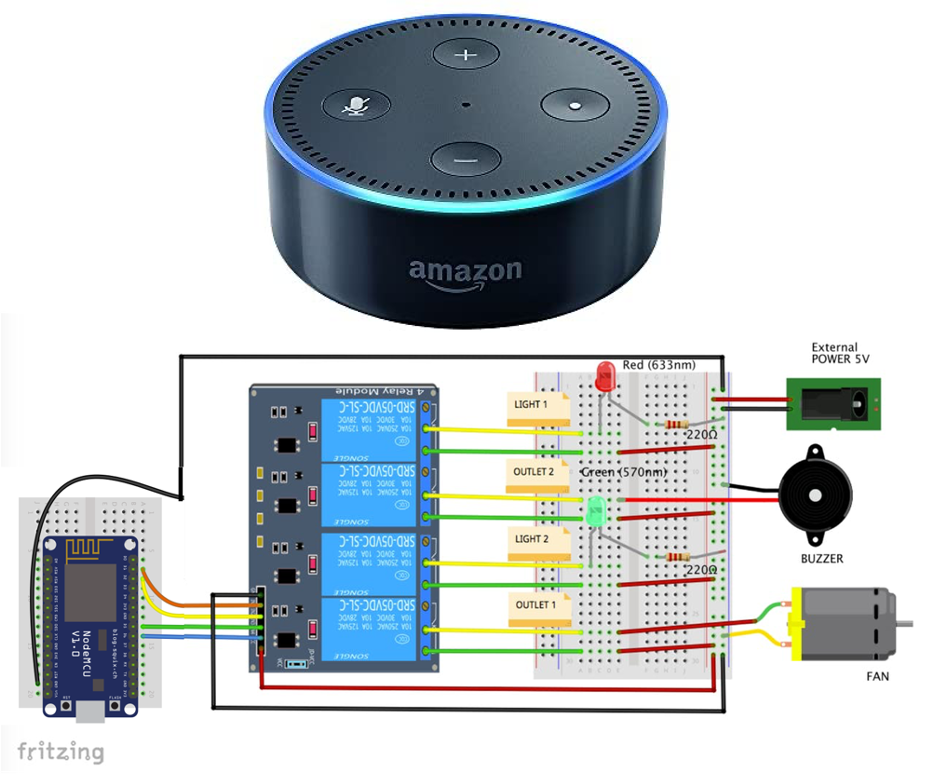
Credit: medium.com
Connecting Devices Via Alexa App
Smart appliances work best when connected to Alexa. The Alexa app helps you add and control devices easily.
This guide shows how to connect your smart appliances using the Alexa app on your phone.
Downloading And Installing The App
First, download the Alexa app from your device’s app store. The app works on both Android and iOS phones.
Once downloaded, open the app and follow the instructions to install it. You will need to sign in with your Amazon account.
- Open Google Play Store or Apple App Store
- Search for “Amazon Alexa”
- Tap “Install” or “Get”
- Open the app after installation
- Sign in with your Amazon account
Adding A New Device
After installing the app, add your smart appliance by opening the Devices tab. Tap the “+” icon to start adding a device.
Select the type of device you want to add and follow the app instructions to connect it to Alexa.
- Open the Alexa app and go to “Devices”
- Tap the “+” icon at the top right
- Choose the device type (e.g., light, plug, thermostat)
- Follow the prompts to connect the device
- Make sure your device is powered on and in pairing mode
Using Voice Commands With Alexa
Smart appliances make life easier by connecting to Alexa. You can control your devices using simple voice commands. Alexa listens and responds quickly to your requests.
This guide explains how to use voice commands and set up routines for your smart appliances. It helps you get the most from your smart home.
Basic Commands To Control Appliances
You can use Alexa to turn appliances on or off. You can also ask Alexa to adjust settings like temperature or brightness. Simple commands make it easy to control your devices.
- “Alexa, turn on the living room light.”
- “Alexa, set the thermostat to 72 degrees.”
- “Alexa, start the coffee maker.”
- “Alexa, stop the fan.”
- “Alexa, dim the kitchen lights to 50%.”
Creating Routines For Automation
Routines let you automate multiple actions with one command. You can create routines in the Alexa app. This saves time and makes your home smarter.
For example, a “Good Morning” routine can turn on lights and start the coffee maker. You can customize routines to fit your daily schedule.
- Open the Alexa app and go to Routines.
- Tap “Create Routine” and name it.
- Choose a voice command to start the routine.
- Add actions like turning on appliances or adjusting settings.
- Save the routine and test it by speaking the command.
Troubleshooting Common Issues
Connecting smart appliances to Alexa can sometimes face issues. These problems stop your devices from working properly.
Knowing how to fix common problems helps you use your smart home smoothly. This guide covers simple ways to solve these issues.
Resolving Connectivity Problems
Connectivity issues are the most common when linking smart appliances to Alexa. Your device may not respond or show as offline.
Check your Wi-Fi connection and make sure your smart appliance is in range. Restart your router and the appliance to refresh the connection.
- Ensure Wi-Fi is working and stable
- Place appliances close to your router
- Restart the router and smart device
- Check for interference from other electronics
- Confirm Alexa app has device permission
Updating Device Software
Old software can cause problems with Alexa integration. Update your smart appliance software regularly to fix bugs.
Use the appliance’s app or website to check for updates. Also, keep your Alexa app updated for the best compatibility.
- Open the appliance’s app to find update options
- Install all available updates immediately
- Keep Alexa app updated on your phone
- Restart devices after updating software
Enhancing Smart Home Security
Connecting smart appliances to Alexa can make your home safer and smarter. You can control devices with your voice and keep an eye on your home.
Smart home security depends on how well you protect your network and manage your devices. Let’s look at key steps to keep your home secure.
Securing Your Wi-fi Network
Your Wi-Fi network is the main link between Alexa and your smart devices. Protecting it stops hackers from getting access.
Use a strong password and update it regularly. Avoid simple words or common phrases. Enable WPA3 or WPA2 encryption for better safety.
- Change default router passwords
- Use strong, unique Wi-Fi passwords
- Enable network encryption (WPA3 or WPA2)
- Turn off Wi-Fi when not in use
- Keep your router firmware updated
Managing Device Permissions
Smart devices have different levels of access to your home data. Control what each device can do to protect your privacy.
Check permissions regularly and remove devices you no longer use. Limit access to only trusted users and apps.
- Review device permissions in the Alexa app
- Remove unknown or unused devices
- Set up voice profiles for family members
- Disable skills or apps that you don’t trust
- Use multi-factor authentication on your accounts

Credit: www.greensafaris.com
Exploring Advanced Features
Connecting smart appliances to Alexa allows easy voice control. Beyond basic commands, you can use advanced features.
These features make your smart home more efficient and tailored to your needs.
Integrating With Other Smart Systems
Alexa works well with many smart systems. You can link your appliances to lights, security, and thermostats.
This integration lets your devices work together smoothly. For example, your oven can signal the vent fan to turn on automatically.
- Connect smart plugs to control appliances remotely
- Use routines to trigger multiple devices at once
- Sync sensors to automate actions like turning off lights
- Combine with smart locks for security during appliance use
Utilizing Third-party Skills
Alexa supports many third-party skills that add new functions. These skills enhance how you control smart appliances.
Skills can help with cooking timers, energy reports, or appliance status updates.
- Enable cooking skills for recipe guidance
- Use energy monitoring skills for saving power
- Check appliance health with diagnostic skills
- Control appliances with voice commands beyond basics
Frequently Asked Questions
How Do I Connect Smart Appliances To Alexa?
To connect smart appliances to Alexa, open the Alexa app, select “Devices,” then “Add Device. ” Choose your appliance type and brand, then follow on-screen instructions to link your account and complete setup.
Which Smart Appliances Work Best With Alexa?
Popular smart appliances compatible with Alexa include smart lights, thermostats, refrigerators, and washing machines. Always check the manufacturer’s compatibility to ensure seamless integration.
Can I Control Multiple Smart Appliances With Alexa?
Yes, Alexa allows control of multiple smart appliances simultaneously. Use groups and routines in the Alexa app for efficient management and voice commands.
Is Wi-fi Required To Connect Smart Appliances To Alexa?
Yes, a stable Wi-Fi connection is essential for Alexa to communicate with smart appliances. Ensure both devices are on the same network for smooth operation.
Conclusion
Connecting smart appliances to Alexa makes daily tasks easier. You control devices using just your voice. Setting up is simple and quick with clear steps. Enjoy hands-free convenience in your home now. Smart living starts with small, easy actions. Try connecting one appliance today and see the difference.
Alexa helps save time and adds comfort to life. Start your smart home journey with confidence.