
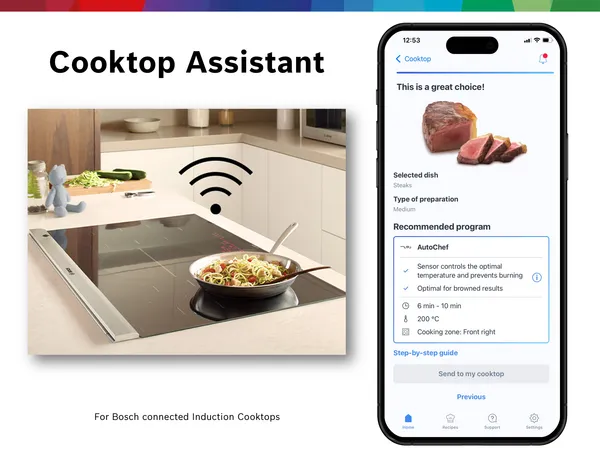
Imagine stepping into your kitchen and having everything work seamlessly for you. From your coffee brewing just the way you like it to your fridge reminding you when you’re running low on essentials.
Sounds amazing, right? You can make this a reality by integrating smart devices into your kitchen. These gadgets don’t just add convenience—they save you time, reduce stress, and even help you cook like a pro. If you want to transform your kitchen into a space that works smarter for you, keep reading.
This guide will show you exactly how to bring smart technology into your kitchen, step by step.
Benefits Of Smart Kitchens
Smart kitchens make cooking easier and more efficient. They use technology to help with everyday tasks.
These kitchens can save time, energy, and even keep you safer. Let’s explore how.
Improved Convenience
Smart devices in the kitchen make cooking simpler. Ovens can preheat themselves before you start cooking.
Fridges can tell you when you need to buy more milk. This saves you trips to the store.
Energy Efficiency
Smart kitchens use less energy. Devices turn off automatically when not in use.
Some appliances adjust power usage based on your needs. This helps reduce energy bills.
- Lights that switch off when no one is in the room
- Smart ovens that cook food faster
- Fridges with better insulation
Enhanced Safety
Smart devices make the kitchen safer. Stoves can turn off if they sense danger.
Smoke detectors alert you to potential fires early. This can prevent accidents.
Remote Control Features
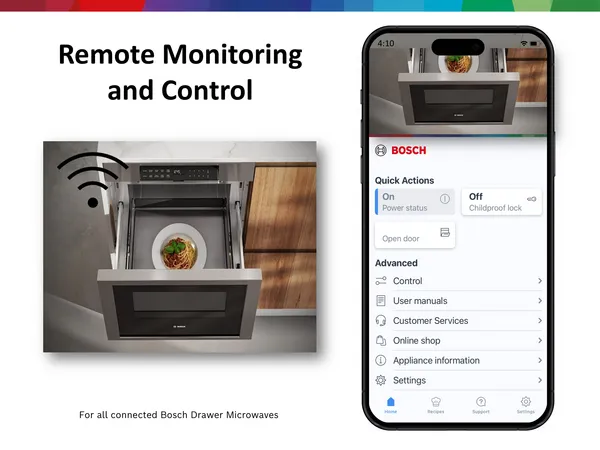
Control your kitchen devices from your phone. You can start the oven while you’re on your way home.
Adjust the fridge temperature even if you’re not in the kitchen. This makes life more flexible.
- Set coffee machines to start brewing before you wake up
- Check fridge contents from your phone
- Monitor kitchen devices remotely
Choosing The Right Smart Devices
Adding smart devices to your kitchen can make cooking easier and more fun. It is important to pick devices that fit your needs and kitchen style.
Think about how each device will help you every day. Choose smart products that work well together and are easy to use.
Smart Appliances
Smart appliances include refrigerators, ovens, and dishwashers with digital controls. They help save time and energy in the kitchen.
Look for appliances with good reviews and simple apps. Check if they fit your kitchen space and match your cooking habits.
Voice Assistants
Voice assistants let you control smart devices using your voice. They can set timers, play music, or help with recipes.
Choose a voice assistant that works with your other smart devices. Make sure it understands your language clearly.
Smart Lighting
Smart lights can change color and brightness. You can control them by phone or voice to create the right mood.
Pick lights that fit your kitchen size and style. Look for energy-saving options and easy installation features.
Smart Plugs And Outlets
Smart plugs let you control small appliances remotely. You can turn devices on or off from your phone.
Choose plugs that support your home’s Wi-Fi and work with your voice assistant. Check their power limits for safety.
Setting Up Your Smart Kitchen Network
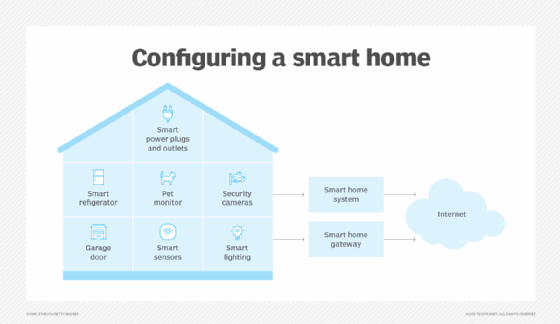
Smart devices in your kitchen need a strong network to work well. Setting up the right system helps devices talk to each other easily.
This guide covers important points for setting up your smart kitchen network. Follow these tips to get started.
Wi-fi Requirements
Your kitchen needs good Wi-Fi for smart devices to connect. Make sure your router covers the whole kitchen area well.
Use a router that supports 2.4 GHz and 5 GHz bands. Many smart devices work better on 2.4 GHz.
- Place the router close to the kitchen
- Use Wi-Fi extenders if the signal is weak
- Secure your Wi-Fi with a strong password
Compatible Hubs And Bridges
Smart hubs or bridges connect multiple devices and help them work together. Pick one that supports your kitchen gadgets.
Some hubs work with many brands, while others support only specific devices. Check what your devices need before buying.
- Smart hubs control lights, speakers, and appliances
- Bridges link devices using Zigbee or Z-Wave signals
- Choose hubs with easy setup and good reviews
Ensuring Device Compatibility
Check if your smart devices work with your chosen hub or Wi-Fi. Some devices only work with certain systems.
Read product details carefully to avoid conflicts. Using compatible devices saves time and avoids frustration.
- Look for devices that support common protocols like Wi-Fi, Zigbee, or Z-Wave
- Check if devices work with your voice assistant if you use one
- Use apps that can control multiple devices from one place
Credit: www.techtarget.com
Installing And Configuring Devices
Smart devices can make your kitchen more convenient and efficient. Installing them correctly is key to getting the best use.
This guide helps you install and set up your smart kitchen devices step-by-step. Follow the instructions for smooth integration.
Step-by-step Installation Tips
Start by reading the device manual carefully. Prepare your kitchen space before installation.
Use proper tools and follow safety instructions. Keep devices away from water and heat sources during setup.
- Unpack devices and check for all parts
- Clear the area where the device will be placed
- Follow the manufacturer’s installation instructions
- Use a level to mount devices evenly
- Secure cables to avoid tripping hazards
Connecting Devices To Your Network
Connect your smart devices to your home Wi-Fi network for control. Make sure your network is stable and fast.
Use the device app to find and connect to your Wi-Fi. Enter your network password carefully to avoid errors.
- Check your Wi-Fi signal in the kitchen
- Open the device app and follow connection prompts
- Select your home Wi-Fi network
- Enter your Wi-Fi password
- Wait for the device to confirm connection
- Test the device to ensure it works online
Customizing Device Settings
Adjust settings to match your kitchen needs. Customize alerts, schedules, and controls using the device app.
Set device preferences to save energy and improve convenience. Regularly update the device software for best performance.
- Open the device app’s settings menu
- Set timers and schedules
- Adjust alert sounds and notifications
- Enable energy-saving modes
- Update device firmware when available
Optimizing Kitchen Workflow
Smart devices can make your kitchen work easier and faster. They help you save time and stay organized.
Using technology in your kitchen improves how you cook and manage tasks. It makes cooking more efficient.
Automating Cooking Processes
Smart appliances can cook food with little help from you. They control temperature and cooking time automatically.
This reduces mistakes and makes your meals more consistent. You can focus on other tasks while food cooks.
- Smart ovens adjust heat for perfect cooking
- Slow cookers start and stop at set times
- Smart coffee makers brew at the right moment
Scheduling And Timers
Setting schedules and timers helps you plan cooking steps. You can start cooking even when you are away.
Smart devices send alerts when food is ready or needs attention. This keeps your kitchen running smoothly.
- Set timers for boiling, baking, and roasting
- Schedule appliance start and stop times
- Receive notifications on your phone
Integrating Voice Commands
Voice control lets you operate devices without using your hands. This keeps your kitchen clean and your hands free.
You can ask your smart assistant to set timers, start appliances, or check recipes. It makes multitasking easier.
- Start or stop cooking with voice commands
- Adjust settings without touching devices
- Ask for cooking tips or ingredient lists
Credit: www.bosch-home.com
Maintaining And Troubleshooting
Smart devices in your kitchen make cooking easier and faster. To keep them working well, you need to maintain and troubleshoot them regularly.
Good care helps avoid problems. Knowing how to fix common issues saves time and stress.
Regular Updates And Maintenance
Keep your smart kitchen devices updated with the latest software. Updates fix bugs and add new features.
Clean your devices often to prevent dust and dirt buildup. Check power cords and connections for damage.
- Set devices to update automatically if possible
- Wipe screens and buttons with a soft cloth
- Inspect cables for wear and tear
- Restart devices occasionally to clear memory
Common Issues And Fixes
Smart kitchen devices can face issues like connection drops or slow responses. Most problems have simple fixes.
Check your Wi-Fi if devices lose connection. Restart devices or reset them if they freeze.
- Check router and Wi-Fi signal strength
- Restart the device to refresh its system
- Reset device settings to default if needed
- Replace batteries or recharge devices regularly
Security Best Practices
Protect your smart kitchen devices from hackers by using strong passwords. Change default passwords right away.
Keep your home network secure and avoid connecting devices to public Wi-Fi. Update security settings often.
- Create unique, strong passwords for each device
- Enable two-factor authentication if available
- Use a secure Wi-Fi network with a strong password
- Regularly check device permissions and access logs
Future Trends In Smart Kitchens
Smart kitchens are changing fast with new technology. These changes will make cooking easier and homes smarter.
We will look at future trends like AI, sensors, and green features. These will shape how kitchens work soon.
Ai Integration
Artificial intelligence helps devices learn user habits. It can suggest recipes or adjust cooking times automatically.
AI can control kitchen tools with voice commands. It also tracks groceries to help with shopping lists.
Advanced Sensors
Sensors detect temperature, humidity, and food freshness. They keep food safe and cooking precise.
Smart sensors can alert you if something is left on too long. They save energy and prevent accidents.
- Temperature sensors for perfect cooking
- Humidity sensors to keep ingredients fresh
- Motion sensors for hands-free controls
- Leak sensors to prevent water damage
Sustainability Features
Smart kitchens will use less energy and water. They help reduce waste and lower utility bills.
Devices can monitor energy use and suggest ways to save. Some recycle water or compost food scraps automatically.
- Energy-efficient appliances
- Water-saving faucets and dishwashers
- Smart composting systems
- Waste tracking to reduce food thrown away

Credit: ernestaandre.lt
Frequently Asked Questions
What Are The Best Smart Devices For Kitchens?
Smart refrigerators, voice assistants, smart ovens, and connected coffee makers are ideal. They improve convenience, energy efficiency, and cooking precision.
How Do Smart Devices Improve Kitchen Efficiency?
Smart devices automate tasks, allow remote control, and provide real-time updates. This saves time, reduces waste, and enhances meal preparation.
Can Smart Kitchen Devices Save Energy?
Yes, many smart kitchen devices optimize energy use. They adjust power based on usage and provide energy consumption feedback, helping reduce bills.
Are Smart Kitchen Devices Easy To Install?
Most smart devices are designed for easy installation. Many come with step-by-step guides and app support for seamless setup.
Conclusion
Smart devices bring ease and fun to your kitchen daily. Choose gadgets that fit your cooking style and needs. Connect devices for smooth control and better results. Start small, then add more tools step by step. Enjoy saving time and reducing effort while cooking.
Your kitchen becomes smarter, making life more comfortable. Embrace technology to cook with more joy and less stress.