
Imagine controlling your oven with just your voice or a simple tap on your phone. Picture your smart oven working seamlessly with your other smart home devices to make cooking easier, faster, and more enjoyable.
If you want to turn your kitchen into a connected hub where everything talks to each other, you’re in the right place. This guide will show you exactly how to integrate your smart oven with your smart home devices, so you can cook smarter, save time, and impress everyone with your tech-savvy kitchen.
Ready to transform your cooking experience? Let’s dive in.

Credit: www.forbes.com
Choosing The Right Smart Oven
Integrating a smart oven with your smart home can make cooking easier. Choose wisely to ensure a seamless connection with other devices.
Consider key features and compatibility with your existing smart home system. This will help you get the most out of your smart oven.
Key Features To Look For
Smart ovens come with various features. Some are essential for smart home integration. Look for these features when choosing your oven.
- Wi-Fi connectivity for remote control
- Voice assistant compatibility
- Energy efficiency settings
- Multi-function cooking modes
Compatibility With Smart Home Systems
Ensure your smart oven works well with your smart home system. Compatibility is key to a smooth experience.
Check if the oven supports the smart platforms you use. This includes popular systems like Alexa, Google Home, and Apple HomeKit.
| System | Compatibility |
| Alexa | Check for voice control features |
| Google Home | Ensure integration with Google Assistant |
| Apple HomeKit | Look for HomeKit-enabled devices |
Popular Smart Home Platforms
Smart ovens can connect with many smart home platforms. This helps you control your oven by voice or app. It makes cooking easier and safer.
Here are three popular platforms to integrate your smart oven with. Each offers unique features for smart home control.
Amazon Alexa
Amazon Alexa lets you control your smart oven using voice commands. You can ask Alexa to preheat, set timers, or check cooking status.
To connect, enable the oven’s Alexa skill in the Alexa app. Then link your oven account to Alexa. You can also create routines for cooking tasks.
- Ask Alexa to start or stop cooking
- Set timers or adjust temperature by voice
- Integrate with other Alexa devices for automation
Google Assistant
Google Assistant supports voice control for many smart ovens. You can use your phone or Google Nest speakers to manage your oven.
Link the oven’s Google Assistant action in the Google Home app. After linking, say commands like “Hey Google, preheat the oven.”
- Use simple voice commands to control cooking
- Check oven status from your phone or speaker
- Create automation with other Google smart devices
Apple Homekit
Apple HomeKit lets you control smart ovens with Siri on your iPhone or iPad. It also works with the Home app for easy control.
To integrate, add your smart oven to the Home app using the provided setup code. You can then use Siri or create scenes including the oven.
- Control oven with Siri voice commands
- Use the Home app to monitor and adjust settings
- Combine oven control with other HomeKit devices
Setting Up Your Smart Oven
Setting up your smart oven is easy and takes only a few minutes. This guide helps you connect your oven to your smart home system. Follow the steps carefully to get started.
First, you need to connect the oven to Wi-Fi. Then, download the oven’s app. Finally, complete the initial setup on the app for full control.
Connecting To Wi-fi
Start by turning on your smart oven. Open the settings menu on the oven’s control panel. Look for the Wi-Fi option and select it.
Choose your home Wi-Fi network from the list. Enter your Wi-Fi password carefully to connect. Wait for the oven to confirm the connection.
- Power on the oven
- Access settings menu
- Select Wi-Fi option
- Pick your home network
- Enter Wi-Fi password
- Confirm connection
Downloading The Oven App
Find the oven’s app in your phone’s app store. The app works on both Android and iOS devices. Download and install the app on your phone.
Open the app after installation. Create an account or log in if you already have one. The app lets you control your oven remotely.
- Open app store
- Search for the oven app
- Download and install
- Open the app
- Sign up or log in
Initial Configuration Steps
After logging in, follow the app’s setup wizard. It will guide you to connect the app to your oven. Make sure your phone and oven are on the same Wi-Fi network.
Set your oven preferences, like language and measurement units. You may also update the oven’s software through the app. Finish setup to start using your smart oven fully.
- Follow setup wizard in the app
- Connect app to oven
- Set preferences (language, units)
- Check for software updates
- Complete setup process
Linking Smart Oven To Home Devices
Smart ovens can connect with your home devices to make cooking easier. Linking them allows you to control the oven remotely and get alerts.
Connecting your smart oven to other devices helps you save time and monitor cooking from anywhere in your house.
Using Voice Assistants
Voice assistants like Alexa, Google Assistant, or Siri let you control your smart oven with your voice. You can set timers, change temperatures, or start cooking hands-free.
To use voice commands, link your smart oven app to the voice assistant app. Then, give simple commands like “Preheat oven to 350 degrees.”
- Open the voice assistant app
- Connect your smart oven device
- Use voice commands to control the oven
Integrating With Smart Speakers
Smart speakers work with your smart oven to send alerts and updates. They can tell you when the food is ready or if you need to add more time.
Pair your oven with smart speakers by enabling the oven’s skill or service in the speaker’s app. This way, you get hands-free updates while cooking.
- Enable oven skill in smart speaker app
- Link your smart oven account
- Receive cooking alerts and status updates
Syncing With Home Automation Hubs
Home automation hubs like Samsung SmartThings or Apple HomeKit connect all your smart devices. Sync your oven to these hubs for better control and automation.
You can create routines that turn on the oven when you arrive home or adjust settings based on your schedule. This makes cooking more convenient and efficient.
- Connect smart oven to your home automation hub
- Create automation routines for cooking
- Control oven with one app alongside other devices
Creating Automation Routines
Smart ovens can work with other smart home devices to save time. Automation routines help you control cooking and other tasks easily.
Setting up routines makes cooking more efficient. You can plan when and how your oven works with other devices.
Scheduling Cooking Times
Schedule your oven to start cooking at specific times. This helps you have meals ready when you want.
You can set the oven to preheat before you arrive home or cook food while you are away.
- Use your phone app to set cooking start and stop times
- Sync oven schedules with your daily routine
- Save frequent cooking times as presets
Combining Oven Use With Other Devices
Connect your smart oven with other devices for smooth cooking. For example, lights can turn on when the oven starts.
You can also link the oven to a smart speaker to get voice updates about cooking progress.
- Turn on kitchen lights automatically when the oven is active
- Use voice assistants to control oven settings
- Sync oven with smart timers or alarms
Using Sensors For Smart Cooking
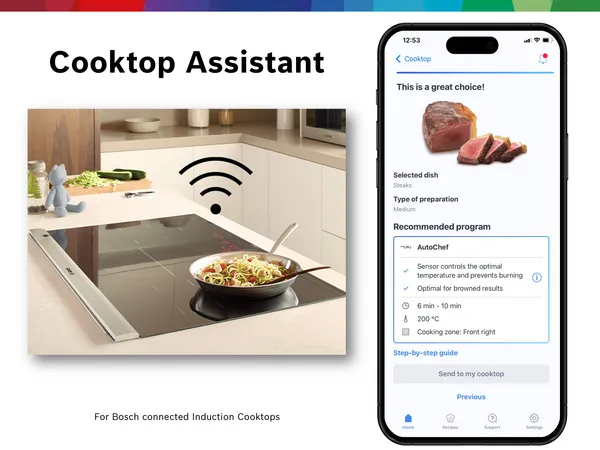
Sensors in smart ovens monitor temperature and food status. These sensors adjust cooking automatically for best results.
Use sensors to pause cooking if you open the oven door or to alert you when food is ready.
- Temperature sensors keep food from burning
- Humidity sensors adjust cooking times
- Door sensors pause cooking when opened
- Motion sensors can trigger alerts or lights
Credit: www.bosch-home.com
Troubleshooting Common Issues
Connecting smart ovens with smart home devices can make cooking easier. Sometimes, problems happen. These problems can stop your oven from working well with other devices.
Here are some common issues and simple ways to fix them. Follow these tips to keep your smart oven running smoothly.
Connectivity Problems
Smart ovens need a good internet or Wi-Fi connection to work with other devices. If the connection is weak, the oven may not respond or update.
Check your Wi-Fi signal near the oven. Move your router closer or remove obstacles. Restart your router and oven to refresh the connection.
- Make sure Wi-Fi is on and connected
- Restart your router and smart oven
- Move router closer to the oven
- Check for Wi-Fi interference from other devices
App Sync Failures
The app controls your smart oven and links it to other devices. Sometimes the app does not sync with the oven correctly. This can stop commands from working.
Try closing and reopening the app. Update the app to the latest version. Check if your phone or tablet is connected to the internet. Restart the oven if needed.
- Close and reopen the smart oven app
- Update the app to the newest version
- Ensure your phone has internet access
- Restart the smart oven to reset sync
Voice Command Errors
Voice commands let you control your smart oven hands-free. Sometimes, the oven does not understand or follow your commands. This can be due to voice recognition issues.
Speak clearly and close to the voice assistant. Check if the voice assistant is listening. Update the voice assistant software. Train it to recognize your voice better.
- Speak clearly and slowly near the microphone
- Make sure the voice assistant is active
- Update the voice assistant software
- Use voice training to improve recognition
Enhancing Kitchen Safety
Smart ovens can connect with smart home devices to improve kitchen safety. This integration helps keep your cooking area secure and gives peace of mind.
With smart features, you can control the oven and get alerts that prevent accidents. These tools make cooking safer and easier.
Smart Alerts And Notifications
Smart ovens send alerts to your phone or smart speakers. These notifications warn you about unusual oven activity or safety risks.
You can get alerts for things like the oven being left on too long or if the temperature is too high. This helps you act quickly to avoid fires or burns.
- Warning if the oven door is open for too long
- Alert if the oven overheats
- Notification when cooking is done
- Reminder to turn off the oven
Monitoring Oven Status Remotely
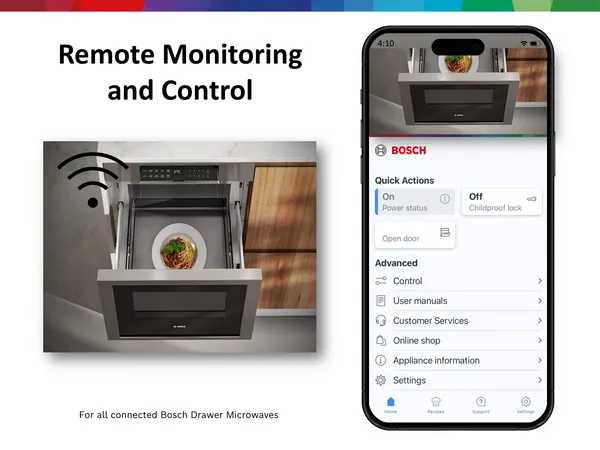
With smart home integration, you can check your oven’s status from anywhere. Use your phone or tablet to see if the oven is on or off.
This remote monitoring helps you avoid leaving the oven on by mistake. You can also adjust settings without being in the kitchen.
- Check oven temperature remotely
- Turn the oven off if forgotten
- Start or stop cooking from afar
- Receive live status updates
Future Trends In Smart Oven Integration
Smart ovens are becoming more connected with other home devices. This helps make cooking easier and more efficient.
The future will bring new ways to link ovens with smart homes. This will improve how we cook and manage our kitchens.
Ai-powered Cooking Assistance
Smart ovens will use artificial intelligence to help with cooking tasks. They can suggest recipes based on what you have.
AI can adjust cooking times and temperatures for better results. It can learn your preferences and improve over time.
- Suggest recipes based on available ingredients
- Automatically adjust cooking settings
- Provide step-by-step cooking guidance
- Learn user habits to customize cooking
Advanced Device Interoperability
Smart ovens will connect smoothly with other devices in the home. This means better control from phones or voice assistants.
Ovens will work with smart fridges, lights, and sensors. This helps create a safer and more energy-efficient kitchen.
- Control ovens via smartphones or voice commands
- Sync with smart refrigerators for ingredient tracking
- Adjust kitchen lighting automatically when cooking
- Use sensors to monitor cooking progress remotely
Credit: electricaco.com.au
Frequently Asked Questions
What Smart Home Devices Work Best With Smart Ovens?
Smart ovens integrate well with devices like Amazon Alexa, Google Home, and Apple HomeKit. These devices enable voice commands and remote control. They enhance convenience by allowing recipe guidance, cooking adjustments, and status updates through your smart home ecosystem.
How Do I Connect My Smart Oven To Wi-fi?
To connect, access your oven’s settings menu and select Wi-Fi setup. Enter your home network credentials when prompted. Ensure your router is stable and near the oven. This connection enables remote control and updates via the oven’s companion app.
Can Smart Ovens Be Controlled Via Smartphone Apps?
Yes, most smart ovens offer dedicated smartphone apps. These apps allow you to start, stop, or adjust cooking remotely. They also provide recipe suggestions, cooking timers, and status notifications for a seamless cooking experience.
Are Smart Ovens Compatible With Voice Assistants?
Smart ovens commonly support voice assistants like Alexa, Google Assistant, and Siri. This compatibility lets you use voice commands to preheat, set timers, or check cooking progress hands-free. It adds ease and multitasking ability in the kitchen.
Conclusion
Integrating smart ovens with your smart home devices makes cooking easier. You can control your oven from anywhere using your phone. This connection helps save time and reduces mistakes. Smart ovens can work with voice assistants for hands-free use. Setting timers and temperatures becomes simple and fast.
Enjoy a smoother kitchen experience with these devices. Start with basic steps and add more features later. Small changes bring big convenience. Embrace smart cooking without confusion or stress.