
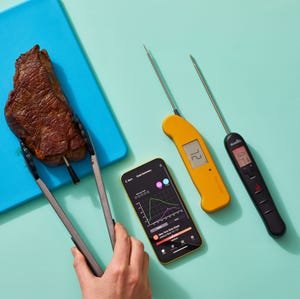
Are you tired of guessing when your food is perfectly cooked? Imagine taking the guesswork out of cooking and serving meals that are just right every time.
Smart thermometers can help you do exactly that. They give you precise temperature readings, so your food is cooked safely and tastes amazing. You’ll discover simple tips to use smart thermometers like a pro. By the end, you’ll feel confident in your cooking and impress everyone at the table.
Keep reading to unlock the secret to perfect meals every time!
:max_bytes(150000):strip_icc()/ses-meater-se-donna-currie-5-f08769239cc5499994cd307d6593078b.jpeg)
Credit: www.thespruceeats.com
Choosing The Right Smart Thermometer
Smart thermometers help you cook meat and food to the right temperature. Picking the right one makes cooking easier and more accurate.
There are many types of smart thermometers with different features. Think about what you need before buying one.
Features To Look For
Look for a thermometer with quick temperature readings. A fast response saves time and avoids overcooking.
Some models offer multiple probes. This helps check several pieces of food at once.
- Fast and accurate temperature readings
- Multiple probes for different foods
- Clear display or app interface
- Alert notifications for target temperatures
- Water-resistant or heat-safe design
Compatibility With Devices
Check if the thermometer works with your phone or tablet. Most use Bluetooth or Wi-Fi to connect.
Make sure the app is easy to use and works on your device’s operating system.
- Bluetooth or Wi-Fi connectivity
- Apps for iOS and Android
- Simple app controls and alerts
- Compatibility with smart home devices (optional)
Budget-friendly Options
Smart thermometers come in many price ranges. You can find good models that do not cost too much.
Focus on basic features like accuracy and ease of use if you want to save money.
- Basic models with single probe
- Simple apps without extra features
- Reliable brands with good reviews
- Check for warranty or customer support
Setting Up Your Smart Thermometer
Setting up your smart thermometer correctly helps you cook with accuracy. This guide covers the basics to get your device ready.
Follow these simple steps to ensure your thermometer works well and connects to your phone or network.
Initial Calibration
Calibration makes sure your thermometer shows the right temperature. Most smart thermometers need this before first use.
To calibrate, place the probe in ice water or boiling water and adjust the reading if needed. Check your manual for exact steps.
Connecting To Wi-fi Or Bluetooth
Connect your smart thermometer to Wi-Fi or Bluetooth to send temperature updates to your phone. Choose the method your device supports.
Turn on the thermometer’s wireless mode and select the device on your phone. Enter passwords if your Wi-Fi needs one.
- Turn on thermometer’s wireless connection
- Open your phone’s settings to find the device
- Select device and enter network password if needed
- Wait for confirmation of connection
App Installation And Setup
Download the thermometer’s app from your phone’s store. The app helps you monitor and control cooking temperatures.
Open the app and follow the setup instructions. Pair your thermometer with the app to start using all features.
- Download the official app from App Store or Google Play
- Create an account or log in if needed
- Follow the app’s guide to pair your thermometer
- Adjust settings like temperature units and alerts
Using Temperature Probes Effectively
Smart thermometers help cooks check food temperatures easily. Using temperature probes right gives accurate results.
Knowing how to place, use, and care for probes improves cooking precision. This guide explains key tips.
Placement For Accurate Readings
Place the probe in the thickest part of the food. Avoid bones or fat because they change the reading.
Insert the probe deep enough to reach the center. Check the temperature before removing food from heat.
- Insert probe into thickest area
- Keep probe away from bones and fat
- Push probe to center of food
- Check temperature early to avoid overcooking
Types Of Probes
There are different probes for various foods and cooking methods. Choose one that fits your needs.
Some probes measure surface temperature, others check internal heat. Wireless probes allow easier monitoring.
- Instant-read probes show quick results
- Leave-in probes stay inside food during cooking
- Wireless probes connect to phones or devices
- Surface probes measure temperature outside food
Maintaining Probe Accuracy
Clean your probe after every use. Dirt and residue can cause wrong readings.
Store probes safely to avoid bending or damage. Calibrate them as recommended by the maker.
- Wash probe with warm, soapy water
- Dry probe before storing
- Keep probe in a protective case
- Check calibration regularly

Credit: www.amazon.ca
Maximizing Cooking Precision
Smart thermometers help you cook food just right. They give accurate temperature readings fast.
Using them well improves taste and safety. Learn how to get the best results.
Setting Target Temperatures
Know the correct temperature for each food type. Set your thermometer to that target before cooking.
This helps avoid undercooking or overcooking. Follow trusted cooking guides for safe temperatures.
- Chicken: 165°F (74°C)
- Beef (medium rare): 135°F (57°C)
- Fish: 145°F (63°C)
Adjusting For Meat Thickness
Thicker meat takes longer to cook inside. Insert the thermometer probe into the center of thick cuts.
Check temperatures early to avoid overcooking thin pieces. Adjust cooking time based on thickness.
- Thin cuts cook faster—check often
- Thick cuts need deeper probe placement
- Use a timer with thermometer alerts
Fine-tuning For Doneness
Use the thermometer to check doneness at the end of cooking. Let meat rest to reach final temperature.
Adjust your target slightly if you want rarer or more cooked food. Each degree counts for taste and texture.
- Rare steak: 125°F (52°C)
- Medium steak: 140°F (60°C)
- Well done: 160°F (71°C)
Leveraging App Features
Smart thermometers come with apps that help you cook precisely. These apps connect to your device and show real-time temperature data.
Using app features can improve your cooking by giving clear information and control. You can watch your food closely and get alerts.
Monitoring Cooking Progress
The app shows the current temperature of your food. You can see how fast it heats up and estimate when it will be done.
Some apps also display graphs or charts. These help you understand the cooking trend and avoid overcooking.
- View live temperature updates
- Track temperature changes over time
- Check estimated time remaining
Using Pre-programmed Settings
Many apps have built-in settings for common foods. These settings tell you the target temperature for each type of meat or dish.
Selecting the right preset saves time. It helps you cook food safely and at the correct doneness level.
- Choose presets for steak, chicken, pork, and more
- Get target temperatures for safety and taste
- Use presets to avoid guessing cooking times
Customizing Alerts And Notifications
Apps let you set alerts for when food reaches a certain temperature. This means you do not need to watch your food constantly.
You can customize notifications for different stages of cooking. This helps you stay on track and stop cooking at the right moment.
- Set temperature alerts for doneness levels
- Receive notifications on your phone or tablet
- Adjust alert sounds or vibrations to suit you
Cleaning And Maintenance Tips
Smart thermometers help you cook food just right. Keeping them clean and well maintained makes them last longer.
Simple care steps keep your thermometer accurate and safe to use every time you cook.
Proper Cleaning Techniques
Always clean the probe after each use. Use warm water and mild soap to remove food residues.
Do not soak the entire thermometer in water. Wipe the body with a damp cloth instead.
- Use a soft cloth or sponge for cleaning
- Avoid harsh chemicals or abrasive scrubbers
- Dry the probe completely before storing
Storing Your Thermometer
Store your thermometer in a cool, dry place. Keep it away from direct sunlight and moisture.
Use the protective case if your thermometer comes with one. This prevents damage to the probe and screen.
- Keep the probe covered to avoid bending
- Do not store near sharp objects
- Place in a spot with easy reach for cooking
Replacing Batteries
Check battery levels regularly to keep your thermometer working well. Replace batteries as soon as power gets low.
Use the right battery type as instructed by the manufacturer. Dispose of old batteries safely.
- Open the battery compartment carefully
- Insert new batteries with correct polarity
- Close the compartment securely after replacement
Troubleshooting Common Issues
Smart thermometers help you cook food perfectly. Sometimes, they may not work as expected. This guide covers common problems and fixes.
Knowing how to solve these issues saves time and prevents cooking mistakes. Check these tips if your thermometer acts up.
Connection Problems
Your smart thermometer connects to your phone or tablet. If it does not connect, cooking can be hard to control.
Try these fixes to solve connection problems quickly.
- Make sure Bluetooth or Wi-Fi is turned on
- Keep the thermometer close to your device
- Restart your phone and the thermometer
- Update the thermometer’s firmware and app
- Remove and re-pair the device in app settings
Inaccurate Temperature Readings
Wrong temperature readings can ruin your food. Your thermometer might not be working right or placed incorrectly.
Use these tips to get accurate readings every time.
- Clean the probe before and after use
- Insert the probe fully into the thickest part of food
- Avoid touching bones or fat with the probe
- Calibrate the thermometer if the option is available
- Replace batteries when the reading is unstable
App Malfunctions
The app controls your smart thermometer and shows data. If the app crashes or freezes, it can stop your cooking process.
Try these steps to fix app problems and keep cooking on track.
- Close and reopen the app
- Check for app updates in your app store
- Clear the app cache in your phone settings
- Reinstall the app if problems continue
- Restart your phone to refresh system resources
Enhancing Cooking Skills
Smart thermometers help you cook food at the right temperature. They improve your control over cooking times and results.
Using these devices makes it easier to learn and try new cooking techniques with confidence.
Experimenting With Recipes
Smart thermometers let you test new recipes by monitoring temperature closely. You can adjust cooking times based on exact heat levels.
Try changing ingredients or cooking methods while checking temperatures. This helps you find the best way to prepare dishes.
- Test different cooking temperatures for meats
- Try various doneness levels safely
- Adjust cooking times by watching temperature changes
Learning From Cooking Data
Smart thermometers often store cooking data for each use. Reviewing this data helps you understand how heat affects your food.
You learn which temperatures make food tender or crispy. This data guides you to cook better every time.
- Track temperature trends during cooking
- Note times when food reaches ideal doneness
- Compare results from different cooking sessions
Sharing Results With Others
Sharing your cooking results helps others learn and improves your skills. You can exchange tips on temperatures and cooking times.
Use smart thermometers to show exact data. This makes your advice clear and easy to follow.
- Share temperature settings for favorite recipes
- Discuss cooking challenges and solutions
- Help friends cook food safely and well
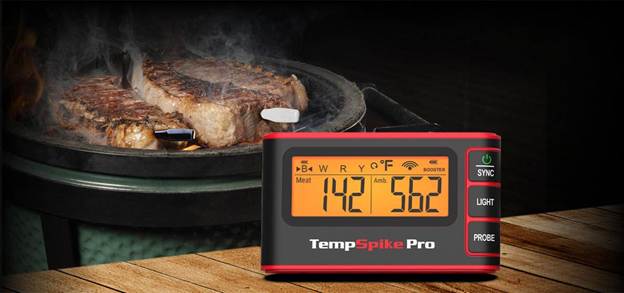
Credit: azbigmedia.com
Frequently Asked Questions
How Do Smart Thermometers Improve Cooking Accuracy?
Smart thermometers provide real-time temperature readings. They help avoid undercooking or overcooking by alerting at precise temperatures. This ensures consistent and perfectly cooked meals every time, improving overall cooking accuracy.
Can Smart Thermometers Work With All Types Of Meat?
Yes, smart thermometers are designed for various meats. They have preset temperature settings for beef, poultry, pork, and fish. This versatility allows precise cooking tailored to each meat type’s ideal internal temperature.
What Are The Best Tips For Using Smart Thermometers Effectively?
Insert the probe into the thickest part of the food. Avoid touching bones or fat for accurate readings. Calibrate the thermometer regularly and follow preset temperature guides for best results.
How Do Smart Thermometers Connect To Mobile Devices?
Most smart thermometers use Bluetooth or Wi-Fi to connect. This lets you monitor cooking remotely through a mobile app. The app sends alerts when your food reaches the desired temperature.
Conclusion
Smart thermometers help cook food just right every time. They save you from guessing temperatures. Use them to check meat, poultry, and baked goods. Remember to clean the probe after each use. Keep the thermometer steady for the best reading.
This tool makes cooking safer and tastier. Try different tips to find what works for you. Enjoy meals cooked perfectly, without stress or guesswork. Cooking gets easier with smart thermometer use. Simple steps bring great results in your kitchen.