
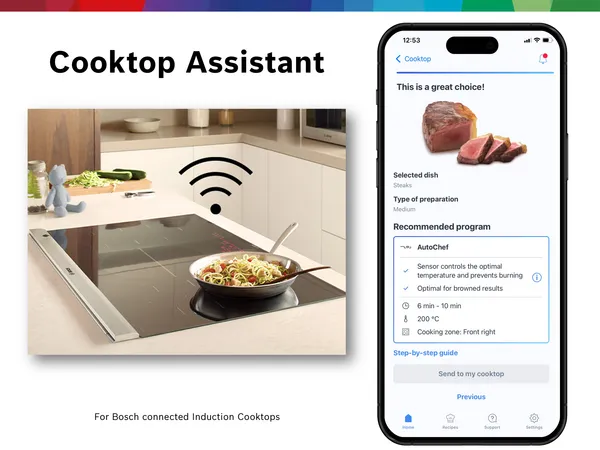
Imagine cooking your favorite meal without juggling cookbooks or guessing cooking times. What if your smart oven could guide you step-by-step, adjusting temperature and time perfectly for every recipe?
Integrating your smart oven with recipe apps can turn this into reality. You’ll discover simple, practical ways to connect these two powerful tools. By the end, you’ll be ready to cook smarter, save time, and enjoy delicious meals with less hassle.
Ready to transform your kitchen experience? Let’s dive in.

Credit: www.forbes.com
Benefits Of Smart Ovens
Smart ovens connect with recipe apps to make cooking easier. They help you cook meals with less effort and more control.
Using a smart oven with a recipe app saves time and reduces mistakes in the kitchen. It also improves your cooking results.
Precise Cooking Control
Smart ovens adjust temperature and cooking time automatically. They follow the recipe instructions exactly.
This control helps you avoid undercooked or burnt food. It gives consistent results every time you cook.
Convenient Remote Operation
You can start or stop the oven from your phone using the recipe app. This means you don’t have to stay in the kitchen all the time.
Remote operation saves time and lets you multitask while cooking.
Step-by-step Cooking Guidance
Recipe apps show detailed cooking steps linked to the smart oven. The oven changes settings as you follow the recipe.
This feature helps beginners cook complex meals with ease and confidence.
Energy Efficiency
Smart ovens use sensors to cook food efficiently. They adjust power to avoid wasting energy.
Connecting with recipe apps ensures the oven runs only as long as needed, saving electricity.
Custom Cooking Preferences
Smart ovens learn your favorite settings from the recipe app. You get meals cooked just how you like them.
You can save and reuse these preferences for quicker cooking in the future.
Choosing The Right Smart Oven
Smart ovens can make cooking easier and more fun. They connect with recipe apps to guide you step-by-step.
Picking the right smart oven is important. It should fit your kitchen and work well with your favorite apps.
Key Features To Look For
Look for smart ovens with clear controls and easy setup. A good oven has multiple cooking modes and good temperature control.
- Wi-Fi or Bluetooth connectivity for remote control
- Precise temperature sensors for even cooking
- Multiple cooking presets for different dishes
- Easy-to-clean interior and removable parts
- Clear display and user-friendly interface
These features help you cook with less guesswork. They also make the oven easier to use every day.
Compatibility With Recipe Apps
Check if the smart oven works with popular recipe apps. This lets you send recipes directly to the oven.
Some ovens link with apps to adjust cooking time and temperature automatically. This saves time and avoids mistakes.
- Supports major recipe apps like SideChef or Yummly
- Can receive cooking instructions through the app
- Syncs with smartphone or tablet easily
- Offers voice control with smart assistants
Using a compatible oven and app makes cooking smoother. It helps you follow recipes without stress.
Popular Recipe Apps For Smart Ovens
Smart ovens are changing how people cook. They can connect with apps to guide users step-by-step.
Recipe apps made for smart ovens help users find and cook meals easily. They offer many recipe choices.
Top Apps To Consider
Several recipe apps work well with smart ovens. These apps offer clear instructions and smart cooking controls.
- SideChef: Offers guided recipes and adjusts oven settings automatically.
- Innovee: Syncs recipes with smart ovens for precise cooking.
- Drop: Provides customizable recipes and real-time cooking help.
- Cookpad: Lets users share recipes and connect with smart devices.
- Tasty: Features video recipes and oven integration for easy cooking.
User-friendly Interfaces
Good recipe apps have simple and clear designs. This helps users of all ages and skills.
These apps use large buttons, easy steps, and clear images. They also sync smoothly with smart ovens.
- Clear step-by-step cooking instructions
- Easy to navigate menus and search options
- Automatic oven setting adjustments
- Visual aids like photos and videos
- Customizable cooking preferences
Connecting Smart Ovens To Apps
Smart ovens can connect to recipe apps for easier cooking. This helps you control the oven and follow recipes.
Linking your smart oven to apps lets you send cooking instructions directly. It also gives you updates while cooking.
Step-by-step Connection Process
Start by turning on your smart oven and making sure it is near your Wi-Fi router. Good Wi-Fi helps the connection.
Open the recipe app on your phone or tablet. Look for the option to add or connect a device.
- Choose your smart oven brand from the list in the app.
- Follow the app’s instructions to put the oven in pairing mode.
- Enter your Wi-Fi password if the app asks for it.
- Wait for the app to confirm the connection.
- Test the connection by sending a simple command like preheat.
Troubleshooting Common Issues
If the oven does not connect, check your Wi-Fi signal. The signal should be strong and stable.
Make sure the oven is in pairing mode. If not, restart the oven and try again.
- Restart your phone or tablet and open the app again.
- Check if the app and oven firmware are up to date.
- Try forgetting the oven in the app and reconnecting.
- Move the oven closer to the Wi-Fi router if the signal is weak.
- Reset the oven’s network settings if needed.
Customizing Cooking Settings
Integrating smart ovens with recipe apps lets you change cooking settings easily. You can adjust temperature and time to suit each recipe.
These custom settings help cook food perfectly and match your taste preferences.
Adjusting Temperature And Time
Smart ovens let you change cooking temperature and time through the app. This helps you follow recipes exactly or try new ideas.
You can lower the temperature for slow cooking or raise it for faster meals. Changing time ensures the food is not undercooked or burnt.
- Set the exact temperature needed for the dish
- Change cooking time based on food size or type
- Save custom settings for future use
Utilizing Pre-programmed Modes
Many smart ovens have pre-programmed modes linked to recipe apps. These modes set temperature and time automatically for common dishes.
Selecting a mode saves you time and reduces mistakes. You can also tweak these modes to fit your preferences.
- Choose modes like bake, roast, or broil
- Modes adjust settings based on the recipe type
- Modify modes to customize cooking results
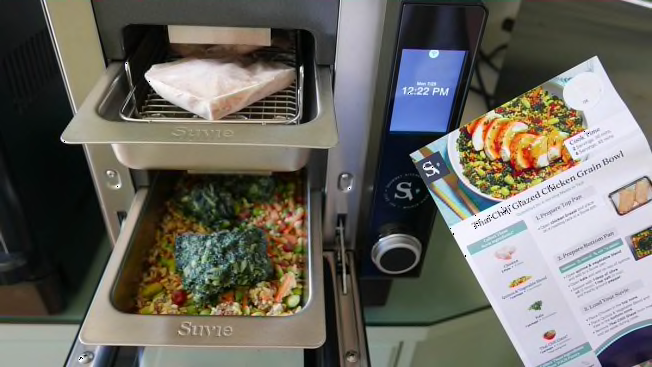
Credit: www.consumerreports.org
Enhancing Cooking Experience
Smart ovens connect with recipe apps to make cooking easier. They help follow recipes step-by-step and adjust cooking times.
This integration saves time and reduces mistakes while cooking at home.
Voice Control Features
Voice control lets you use your smart oven hands-free. You can start, stop, or change settings by speaking commands.
This helps keep your hands clean and focus on preparing ingredients without touching screens.
- Ask the oven to preheat to a set temperature
- Change cooking time without touching the oven
- Get recipe steps read aloud while cooking
Remote Monitoring And Alerts
Remote monitoring allows you to check your oven from your phone. You can see cooking progress anytime, anywhere.
The oven sends alerts when cooking is done or needs your attention. This helps avoid overcooked meals.
- Receive notifications when food is ready
- Adjust temperature remotely if needed
- Track cooking time from outside the kitchen
Future Trends In Smart Cooking
Smart ovens are changing how people cook at home. They connect with recipe apps to make cooking easier.
New technology will improve smart cooking. These changes will help users save time and cook better meals.
Ai Integration
AI helps smart ovens learn your cooking habits. It can suggest recipes based on your preferences and ingredients.
AI can adjust cooking times and temperatures automatically. This makes meals more consistent and tasty.
- Personalized recipe suggestions
- Automatic cooking adjustments
- Voice control and smart assistants
- Real-time cooking monitoring
Sustainability Innovations
Smart ovens will use energy more efficiently to reduce waste. This helps lower electricity bills and protect the planet.
Recipe apps will promote using local and seasonal ingredients. This supports sustainable food choices and less food waste.
- Energy-saving cooking modes
- Alerts to avoid overcooking and waste
- Support for eco-friendly ingredients
- Integration with smart home energy systems
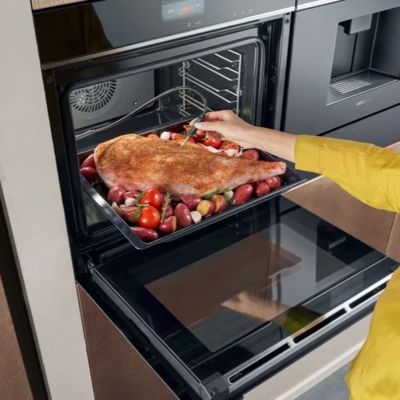
Credit: www.siemens-home.bsh-group.com
Frequently Asked Questions
How Do Smart Ovens Connect With Recipe Apps?
Smart ovens connect via Wi-Fi or Bluetooth to recipe apps. This enables automatic temperature and time settings. Users can control the oven remotely through their smartphones. The integration simplifies cooking by syncing recipes with oven functions seamlessly.
Which Recipe Apps Work Best With Smart Ovens?
Popular apps like Tasty, Yummly, and SideChef integrate well with smart ovens. They offer step-by-step instructions and smart cooking controls. Compatibility depends on the oven brand and app features. Always check your oven’s supported apps for best results.
Can I Customize Cooking Settings Through Recipe Apps?
Yes, most recipe apps let you adjust temperature and cooking time. This customization ensures recipes match your taste preferences. The app sends these changes directly to the smart oven. It offers greater flexibility and control over your cooking.
Is Wi-fi Required To Use Smart Oven Integrations?
Yes, Wi-Fi is typically required for full smart oven and app integration. It allows real-time communication between devices. Without Wi-Fi, remote control and automatic updates may not work. A stable internet connection enhances the user experience.
Conclusion
Integrating smart ovens with recipe apps makes cooking easier and fun. You get precise cooking times and temperatures from the app. This saves time and reduces mistakes in the kitchen. Many apps offer step-by-step guides that sync with your oven.
This way, you can focus on preparing meals without worry. Smart ovens and recipe apps work well together for better results. Start exploring the features today and enjoy smarter cooking at home. Simple steps can improve your daily cooking routine greatly.