
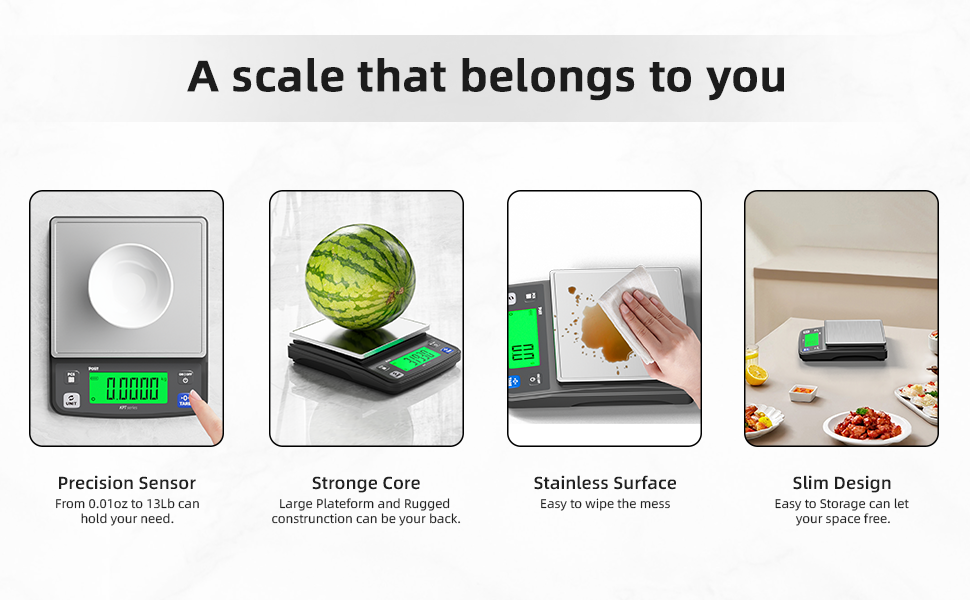
Are you tired of guessing measurements in your recipes? Using smart kitchen scales can change that.
They help you measure ingredients with precision, making your cooking and baking more consistent and enjoyable. But to get the best results, you need to use them correctly. You’ll discover simple tips to use your smart kitchen scales accurately, so every meal you make turns out just right.
Keep reading to unlock the full potential of your kitchen gadget and impress everyone with your culinary skills.
Benefits Of Smart Kitchen Scales
Smart kitchen scales help measure food with great accuracy. They connect to apps that track your meals and nutrition.
Using smart scales can improve cooking, dieting, and food preparation. They save time and reduce mistakes in the kitchen.
Precise Measurement For Recipes
Smart kitchen scales give exact weights in grams or ounces. This helps follow recipes exactly and get better results.
They reduce errors from guessing amounts. This is useful for baking, where precision is important.
Track Nutritional Information
Many smart scales connect to apps that track calories, protein, and other nutrients. This helps manage diets easily.
You can log meals quickly and see detailed nutrition facts. This supports healthy eating and weight control.
Easy Food Portion Control
Smart scales help control food portions by weighing servings before eating. This stops overeating and food waste.
Portion control helps people with specific diet plans stay on track without guesswork.
Save Time With Tare Function
The tare function resets the scale to zero after adding a container. This makes measuring multiple ingredients faster.
You can add each ingredient directly on the same plate without removing anything in between.
Connects With Other Smart Devices
Smart kitchen scales can link with phones, tablets, or smart assistants. This allows easy data syncing and voice control.
They help organize cooking and meal tracking in one place for convenience.

Credit: polit-global.com
Choosing The Right Smart Scale
Smart kitchen scales help measure ingredients with ease and accuracy. Picking the right one is key to good results.
Many smart scales have different features. Knowing what to look for saves time and helps you cook better.
Features To Consider
Look for scales that offer precise measurements. Check if they can weigh in grams, ounces, and milliliters.
Extra features like tare function and automatic unit conversion make weighing easier.
- High precision sensors
- Multiple unit options
- Tare function to subtract container weight
- Easy-to-read display
Compatibility With Devices
Check if the smart scale works with your phone or tablet. Some scales connect via Bluetooth or Wi-Fi.
Apps can help track your measurements and save recipes. Make sure the app works on your device’s system.
- Bluetooth or Wi-Fi connection
- App availability for iOS and Android
- Easy syncing with devices
User-friendly Interface
Choose a scale with simple buttons and clear instructions. A bright display helps you read numbers easily.
Easy setup and use save time. Some scales have touchscreens or voice commands for better control.
- Clear digital display
- Simple button controls
- Quick setup guide
- Optional touchscreen or voice control
Setting Up Your Smart Scale
Smart kitchen scales help you measure food with ease and accuracy. Setting them up correctly is important for best results.
Follow simple steps to connect and calibrate your smart scale. This ensures it works well every time you use it.
Connecting To Apps
Most smart scales connect to apps on your phone or tablet. These apps track your food weight and nutrition.
To connect, turn on Bluetooth or Wi-Fi on your device. Open the app and follow the instructions to pair your scale.
- Make sure your scale has fresh batteries or is charged
- Keep your phone close to the scale during setup
- Allow permissions if the app asks for them
- Check for app updates to avoid connection problems
Calibrating For Accuracy
Calibration makes sure your smart scale shows correct weights. It is important to do this before using the scale often.
Use a known weight or object to check if the scale is accurate. Follow the scale’s instructions to adjust the readings.
- Place the scale on a flat, stable surface
- Turn it on and wait for zero reading
- Place a calibration weight on the scale
- Adjust the scale using the app or buttons if the weight is off
- Repeat if needed to get exact measurements

Credit: www.amazon.ca
Weighing Ingredients Precisely
Using a smart kitchen scale helps you weigh ingredients with great accuracy. This is important for cooking and baking recipes.
Precise measurements lead to better taste and consistent results every time.
Using Tare Function
The tare function lets you subtract the weight of containers or bowls. This helps you measure only the ingredient’s weight.
To use tare, place the empty container on the scale. Press the tare button to reset the scale to zero. Then add your ingredient.
- Place container on scale
- Press tare button to reset weight
- Add ingredient to measure accurately
Measuring Liquids Vs. Solids
Smart kitchen scales can measure both liquids and solids. Use a container when measuring liquids to avoid spills.
Solids can go directly on the scale or in a bowl. Liquids need a container that is safe and does not leak.
- Use a bowl or cup for liquids
- Place the container and tare before adding liquid
- Solids can be weighed directly or in a container
Utilizing Smart Features
Smart kitchen scales offer features that help you cook with accuracy. These tools connect to apps and give you extra information.
Using these smart features can make your cooking easier and healthier. They save time and reduce mistakes.
Recipe Integration
Smart scales link with recipe apps to guide you through cooking steps. They show exact ingredient weights and adjust amounts as needed.
This feature helps keep your recipes consistent. You can follow recipes without guessing measurements.
- Connect the scale to a recipe app
- Place ingredients on the scale as the app shows
- The app updates ingredient amounts automatically
- Measure multiple ingredients without removing earlier ones
Nutritional Tracking
Smart kitchen scales can track nutrition facts like calories, fats, and proteins. They send data to health apps for daily summaries.
This helps you watch your diet by knowing what you eat. The scale shows nutrition info for each ingredient you weigh.
- Weigh your food on the smart scale
- The scale sends data to your nutrition app
- See calories and nutrients per ingredient
- Track daily intake easily from your phone
:max_bytes(150000):strip_icc()/faw-oxo-good-grips-11lb-stainless-steel-food-scale-pull-out-display-nsimpson-47-fddd2161f20f4bfe982395c1f4676b34.jpeg)
Credit: www.foodandwine.com
Maintaining Your Smart Scale
Smart kitchen scales need care to stay accurate. Regular maintenance helps them last longer.
Keep your scale clean and manage its power well. This keeps measurements correct every time.
Cleaning Tips
Wipe the scale surface after each use. Use a soft, damp cloth to avoid scratches.
Do not use harsh chemicals or soak the scale. Water can damage the electronic parts inside.
- Use gentle soap if needed
- Dry the scale completely before use
- Clean sensors carefully to keep accuracy
Battery Management
Check the battery level regularly to avoid sudden power loss. Replace batteries as soon as they run low.
Remove batteries if you won’t use the scale for a long time. This prevents battery leaks that can harm the device.
- Use the recommended battery type
- Store batteries in a cool, dry place
- Keep battery contacts clean and free of dirt
Troubleshooting Common Issues
Smart kitchen scales make cooking easier by giving exact measurements. Sometimes, they face problems that affect their use.
This guide helps you fix common issues like connection problems and wrong readings. Follow these tips for smooth use.
Connection Problems
Your smart kitchen scale may lose connection with your phone or app. This can stop the scale from sending data properly.
Check if Bluetooth or Wi-Fi is turned on and working on both devices. Keep the scale close to your phone to keep connection strong.
- Turn Bluetooth off and on again on your phone
- Restart the smart scale by turning it off and on
- Make sure the scale is charged or has fresh batteries
- Close and reopen the app connected to the scale
- Remove old connections and pair the scale again
Inaccurate Readings
Your scale might show wrong numbers. This can happen if it is not set up or used correctly.
Always place the scale on a flat, hard surface. Avoid using it on soft or uneven surfaces like carpets or mats.
- Calibrate the scale regularly as per the manual
- Clean the scale platform to remove dust or food bits
- Do not overload the scale beyond its maximum weight limit
- Make sure the scale is zeroed before measuring
- Keep the scale away from strong vibrations or air drafts
Frequently Asked Questions
How Do I Calibrate A Smart Kitchen Scale?
To calibrate, place the scale on a flat surface. Use the calibration weight provided or a known weight. Follow the scale’s app or manual instructions for precise calibration.
Can Smart Kitchen Scales Measure Liquids Accurately?
Yes, many smart scales include a tare function to subtract container weight. They can convert volume measurements, ensuring accurate liquid measurement in milliliters or ounces.
How Do I Maintain Accuracy Over Time?
Keep your scale clean and dry. Avoid overloading it beyond its maximum capacity. Regularly recalibrate according to manufacturer guidelines to maintain precision.
What Foods Can I Weigh With Smart Kitchen Scales?
Smart scales can weigh solids and liquids like flour, sugar, fruits, and oils. They help track nutritional information for various foods, aiding in precise cooking and dieting.
Conclusion
Using smart kitchen scales can make cooking easier and more precise. Always place the scale on a flat surface before measuring. Tare your container to avoid extra weight in your readings. Check the units and switch them if needed for your recipe.
Clean the scale gently after use to keep it working well. Practice these simple steps to get the best results every time. Smart scales help you cook with confidence and save ingredients. Try these tips and enjoy better cooking today.